
Can You Compare Two Excel Files? Importance and Methods Explained
Learn how to efficiently compare two Excel files to ensure data accuracy and integrity.
Introduction
Comparing Excel files is more than just a routine task; it’s a vital component in preserving data integrity across various sectors, particularly in finance. With an astonishing 38% of work involving spreadsheets, the ability to pinpoint discrepancies accurately can profoundly influence decision-making and operational efficiency. Yet, many professionals face the daunting challenge of ensuring their data remains consistent and error-free.
How can they effectively navigate the complexities of comparing two Excel files? What tools can streamline this essential process? The answer lies in leveraging innovative solutions like ShortieCuts, designed to simplify and enhance the comparison process, ensuring that your data integrity is never compromised.
Define Comparing Excel Files: Understanding the Basics
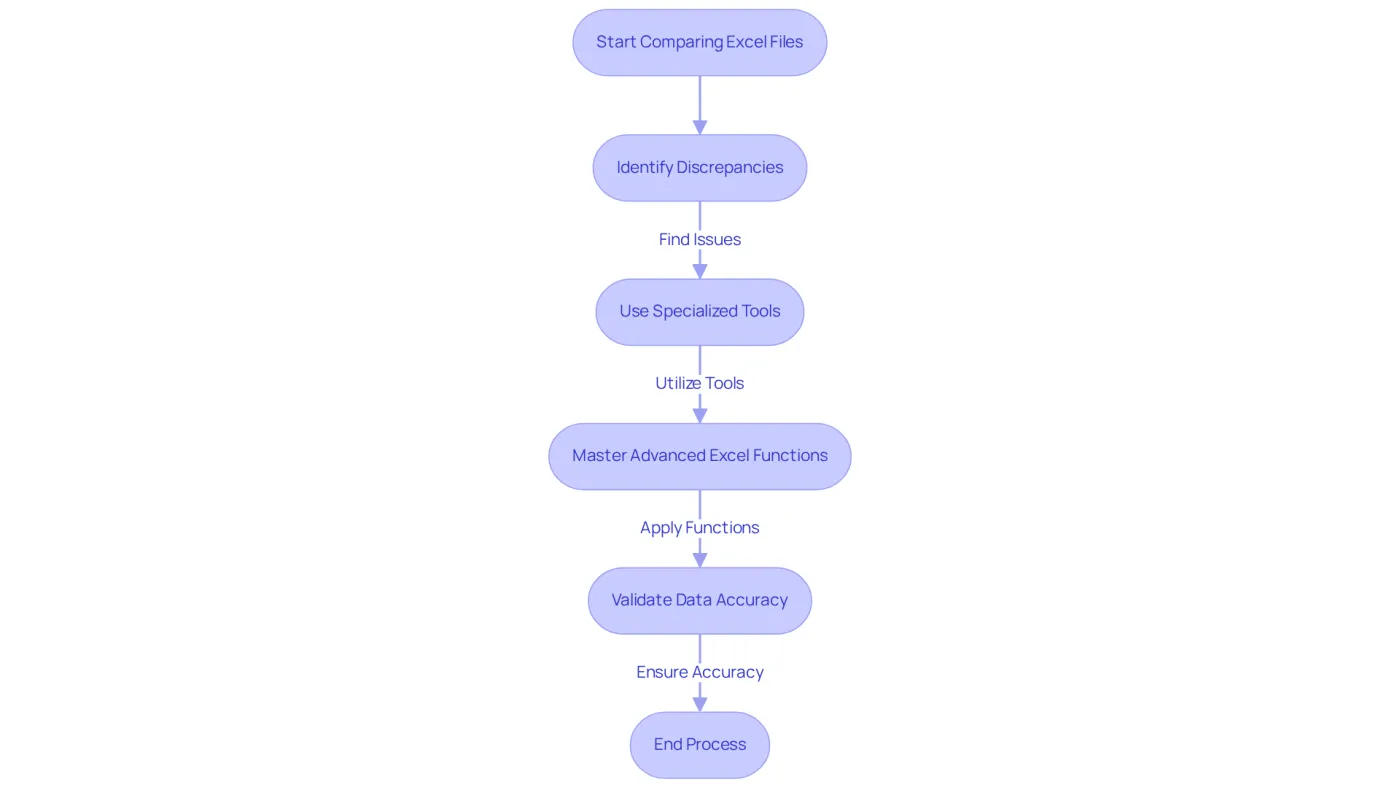
A critical procedure in data management is when you can compare two Excel files to examine discrepancies in information, formulas, formatting, and other components. This practice is vital for maintaining information integrity, particularly in environments where multiple versions of a document may exist. Regularly comparing files enables professionals to track changes, validate data accuracy, and consolidate information from various sources. Did you know that studies show the average proportion of work involving spreadsheets is around 38%? This statistic underscores how frequently finance professionals engage in this essential task.
To streamline this process, users can leverage specialized tools designed to automate evaluations, significantly boosting efficiency and minimizing the risk of human error. Tools like Synkronizer and Ablebits Compare Sheets offer user-friendly interfaces that facilitate quick identification of discrepancies, making them invaluable for finance professionals managing extensive datasets.
Moreover, mastering advanced Excel functionalities is crucial. Experts emphasize the importance of utilizing logical functions and automation features to ensure accurate comparisons. As Pratibha Kumari J. notes, "the essential task is to master advanced Excel functionalities - exploring intricate formulas, automation with VBA, and utilizing features like Power Query and Power Pivot for strong information management." As reliance on Excel continues to grow, professionals often ask, can you compare two Excel files efficiently to maintain information accuracy and optimize their workflows?
Neglecting to compare documents can lead to significant operational risks, such as data errors and miscommunication. This reality further highlights the importance of this essential task. Don't let inaccuracies compromise your work - embrace the tools and techniques that can enhance your Excel capabilities.
Context and Importance: Why Comparing Excel Files Matters
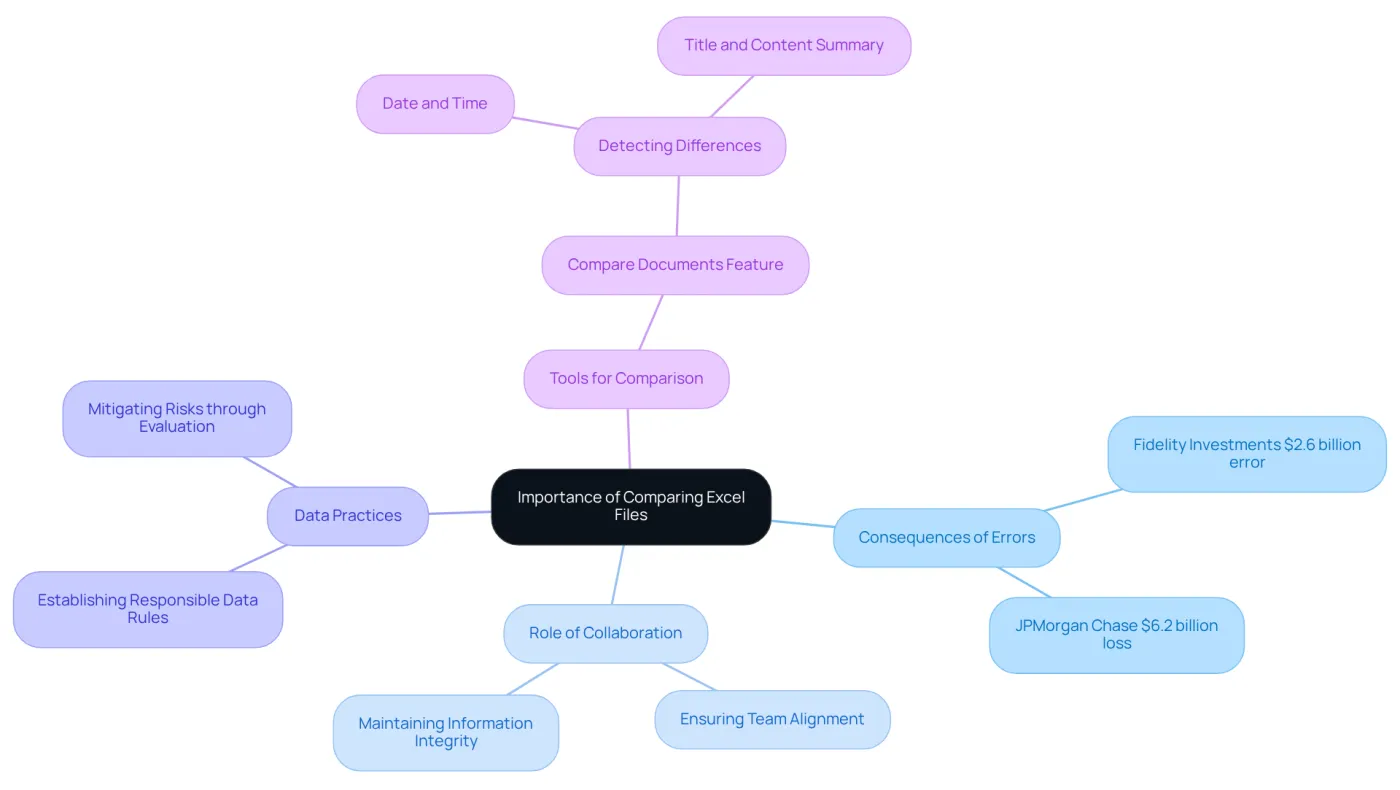
In the finance and information analysis sectors, the necessity arises where you might ask, can you compare two Excel files to guarantee accuracy and consistency in reporting? Financial analysts face the critical task of evaluating different versions of spreadsheets to ensure that all information remains current and precise. This diligence is vital in preventing costly mistakes. For instance, a clerical error in 1994 led Fidelity Investments to miscalculate a distribution estimate by a staggering $2.6 billion. More recently, in 2012, JPMorgan Chase & Co suffered losses of at least $6.2 billion due to errors in a risk model. These incidents underscore the severe consequences of relying on unverified information.
Moreover, the question of can you compare two Excel files plays a crucial role in identifying changes made by collaborators, ensuring that all team members stay aligned and that the integrity of information is upheld. The ability to analyze documents efficiently not only enhances productivity but also sharpens decision-making skills, making it an essential competency for Excel users in the finance sector.
Statistics reveal that only 45% of organizations have established rules and processes to enforce responsible data practices, contributing to a high error rate in financial reports. By prioritizing document evaluation, analysts can mitigate these risks and foster a more reliable financial reporting environment.
The 'Compare documents' feature is particularly valuable, especially when you consider how it can help answer the question, can you compare two Excel files, by detecting differences in date, time, title, and content summary. This tool empowers analysts to ensure accuracy in their work. As financial experts emphasize, the capacity to verify data through comparison is crucial for informed decision-making and maintaining stakeholder trust.
Methods of Comparison: Tools and Techniques for Excel Files
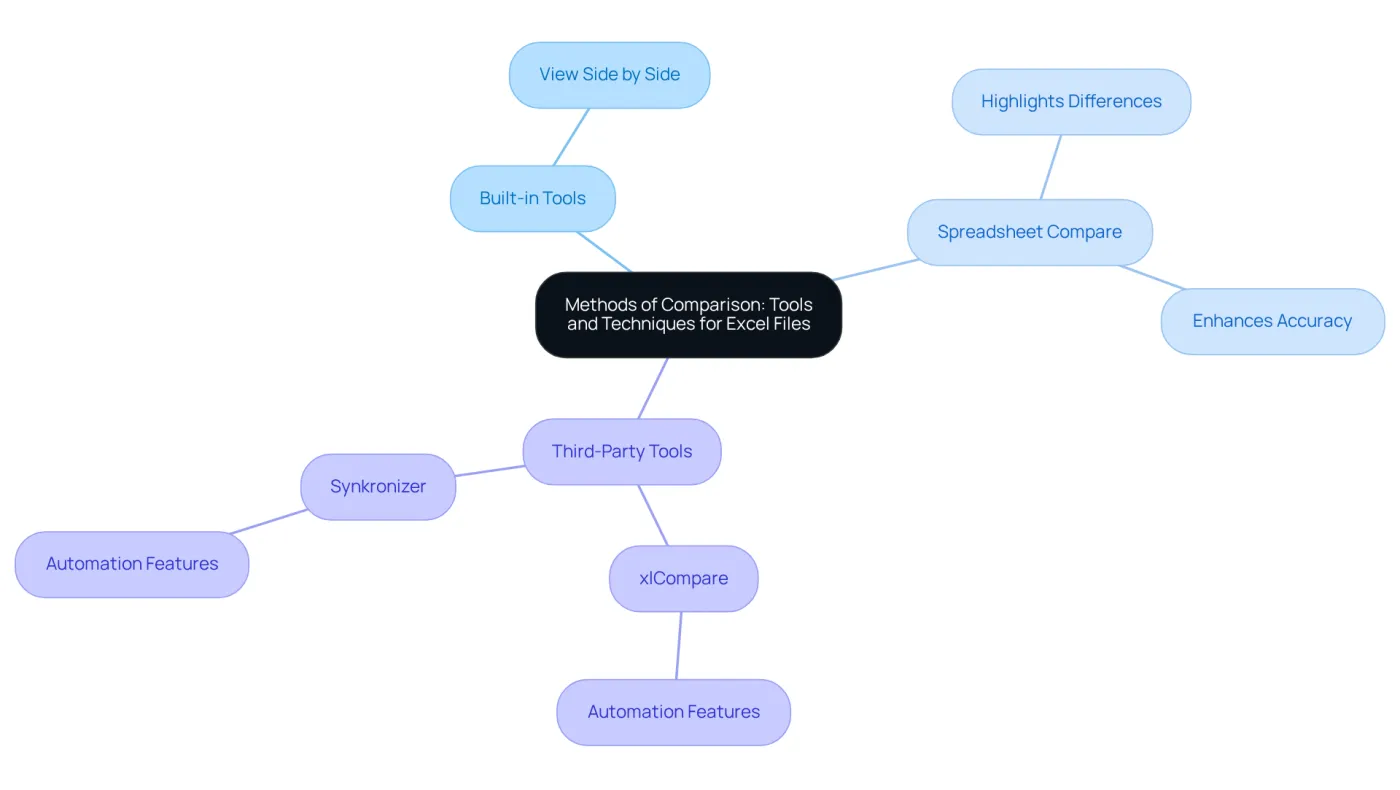
Many users wonder, can you compare two Excel files, as it presents a challenge, but various methods exist to effectively address this issue. One of the most accessible options is Excel's built-in 'View Side by Side' feature. This tool allows users to visually compare two open workbooks, making it particularly beneficial for financial analysts who need to quickly spot discrepancies between datasets.
For a more comprehensive analysis, the 'Spreadsheet Compare' tool included in Microsoft Office stands out. It highlights differences in formulas, values, and formatting, which is especially advantageous for users managing complex financial models. By simplifying the detection of mistakes and inconsistencies, this tool enhances accuracy in reporting, ensuring that financial outcomes are not compromised.
For those seeking advanced capabilities, third-party tools like xlCompare and Synkronizer offer robust features for comparing large datasets. These tools automate the evaluation process, significantly cutting down the time spent on manual checks and minimizing the risk of human error. In fact, studies indicate that utilizing automated comparison tools can boost productivity by up to 30%, making them invaluable for finance professionals.
Real-world applications of these tools further demonstrate their effectiveness. Financial analysts frequently rely on the 'Spreadsheet Compare' tool to ensure accuracy in reporting, as it allows for quick identification of changes that could impact financial outcomes. By understanding these various techniques, users can determine how they can compare two Excel files to select the most suitable method for their specific needs, ultimately enhancing their analytical capabilities.
Challenges in Comparing Excel Files: Solutions and Best Practices
The Challenge of Comparing Excel Files
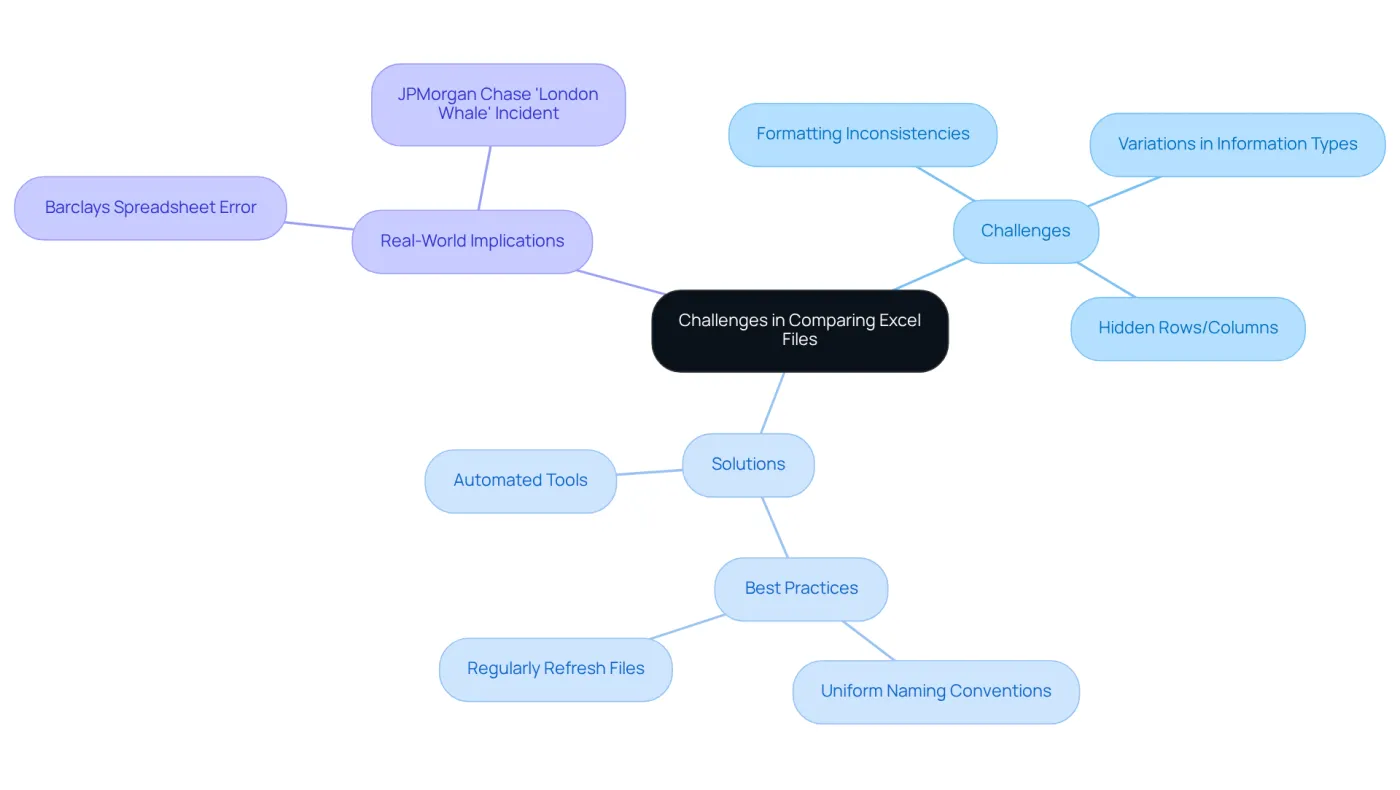
Comparing Excel files is crucial for ensuring information accuracy, yet it poses significant challenges. Users often face formatting inconsistencies, variations in information types, and hidden rows or columns that complicate the evaluation process. Manual evaluations of large datasets can be tedious and prone to errors. In fact, studies reveal that nearly 90% of spreadsheets contain substantial errors, primarily due to human mistakes. This statistic underscores the importance of meticulous information handling in document evaluations.
The Solution: Automated Tools
To effectively address these challenges, leveraging automated tools is highly recommended. These tools can efficiently process large volumes of information, accurately highlighting differences and discrepancies. Implementing best practices for maintaining data integrity during comparisons is essential:
- Ensure both files are in the same format to avoid compatibility issues.
- Implement uniform naming conventions for documents and information to simplify the comparison process.
- Regularly refresh files to reflect the most recent information, minimizing the risk of using outdated material.
By establishing comprehensive policies for spreadsheet creation, organizations can significantly enhance information integrity.
Real-World Implications
Real-world examples illustrate the critical nature of these practices. The infamous Barclays spreadsheet error, which led to substantial financial losses, and the JPMorgan Chase 'London Whale' incident, resulting in over $6 billion in losses due to spreadsheet errors, highlight the necessity for diligent information management and evaluation techniques.
Enhancing Your Processes
By adopting these proactive strategies, users can improve their file comparison processes, ultimately leading to more reliable data analysis and informed decision-making. As Mukund Raut aptly states, "Excel’s undo button: where mistakes turn into learning opportunities," reminding us that errors can serve as valuable learning experiences.
Conclusion
Comparing two Excel files transcends mere technicality; it’s a vital practice that safeguards data accuracy and integrity across various sectors, especially in finance and data analysis. By mastering the methods and tools available for file comparison, professionals can pinpoint discrepancies that might otherwise lead to significant operational risks and financial errors.
This article underscores several key arguments, notably the importance of leveraging specialized tools like Synkronizer and Spreadsheet Compare. These tools not only streamline the comparison process but also enhance productivity. Furthermore, it emphasizes the critical role of adopting best practices and automated solutions to tackle the common challenges associated with manual comparisons. Real-world examples vividly illustrate the severe consequences of neglecting this essential task, reinforcing the necessity of diligent information management.
Ultimately, the ability to compare Excel files effectively is paramount for maintaining the quality and reliability of data. As reliance on spreadsheets continues to escalate, embracing the right tools and techniques will not only bolster accuracy but also empower professionals to make informed decisions and uphold stakeholder trust. Prioritizing this practice is essential for fostering a culture of accountability and precision in data management.
Frequently Asked Questions
Why is comparing Excel files important?
Comparing Excel files is crucial for examining discrepancies in information, formulas, formatting, and other components, which helps maintain information integrity, especially when multiple versions of a document exist.
How often do finance professionals work with spreadsheets?
Studies show that the average proportion of work involving spreadsheets is around 38%, indicating that finance professionals frequently engage in tasks related to Excel.
What tools can help automate the comparison of Excel files?
Tools like Synkronizer and Ablebits Compare Sheets are designed to automate evaluations, helping users quickly identify discrepancies and boosting efficiency while minimizing human error.
What advanced Excel functionalities should users master for effective comparisons?
Users should master advanced Excel functionalities such as logical functions, automation features, intricate formulas, and tools like VBA, Power Query, and Power Pivot for strong information management.
What risks are associated with neglecting to compare Excel documents?
Neglecting to compare documents can lead to significant operational risks, including data errors and miscommunication, which can compromise the accuracy of work.