
Master How to Extract Table from PDF to Excel in 4 Easy Steps
Learn how to extract table from PDF to Excel effortlessly in just four simple steps.

Introduction
Extracting tables from PDF documents often feels like navigating a maze, with the path to clear and usable data fraught with obstacles. This critical skill is essential for anyone aiming to transform static information into dynamic spreadsheets. However, many face challenges such as misalignment and garbled text.
By mastering the techniques outlined in this guide, you will uncover effective methods for extracting tables from PDFs to Excel. This knowledge will enable you to streamline your data manipulation processes, making your work more efficient and productive.
What strategies can you employ to overcome the inherent complexities of PDF formats and ensure accurate extraction? Let’s explore the solutions that will empower you to tackle these challenges head-on.
Understand the Basics of PDF Table Extraction
Mastering PDF Table Extraction: A Key to Data Manipulation
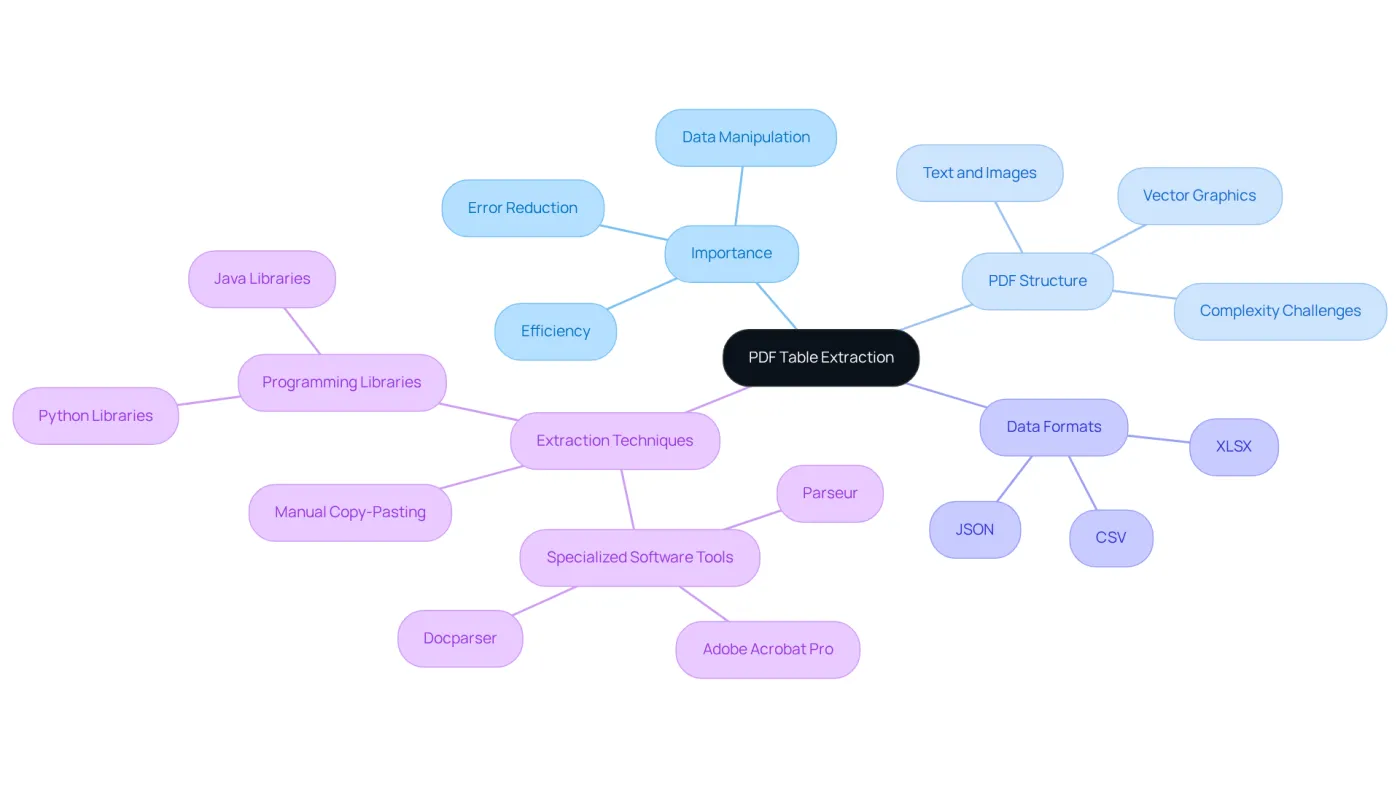
PDF table extraction is crucial for converting tabular information from PDF documents into easily manipulable formats like Excel. However, the challenge arises because PDFs are designed for presentation, not for data manipulation. This often results in misaligned columns and garbled text. Understanding the structure of the PDF and the characteristics of the information is essential for effective extraction.
Understanding PDF Structure
PDFs can contain a mix of text, images, and vector graphics, complicating the extraction of structured data. Recognizing this complexity is the first step in overcoming the challenges of PDF extraction.
Familiarizing with Data Formats
It's important to familiarize yourself with various data formats, such as CSV and XLSX. Knowing how to best utilize the extracted data can significantly enhance your workflow and data analysis capabilities.
Exploring Extraction Techniques
There are several methods for obtaining information from PDFs. These include:
- Manual copy-pasting
- Using specialized software tools
- Employing programming libraries
Each method has its advantages, and understanding them will help you choose the right approach for your needs.
By grasping these fundamentals, you will be better equipped to select the most effective extraction method, such as how to extract table from pdf to excel, ultimately streamlining your data manipulation processes.
Explore Methods for Extracting Tables from PDFs
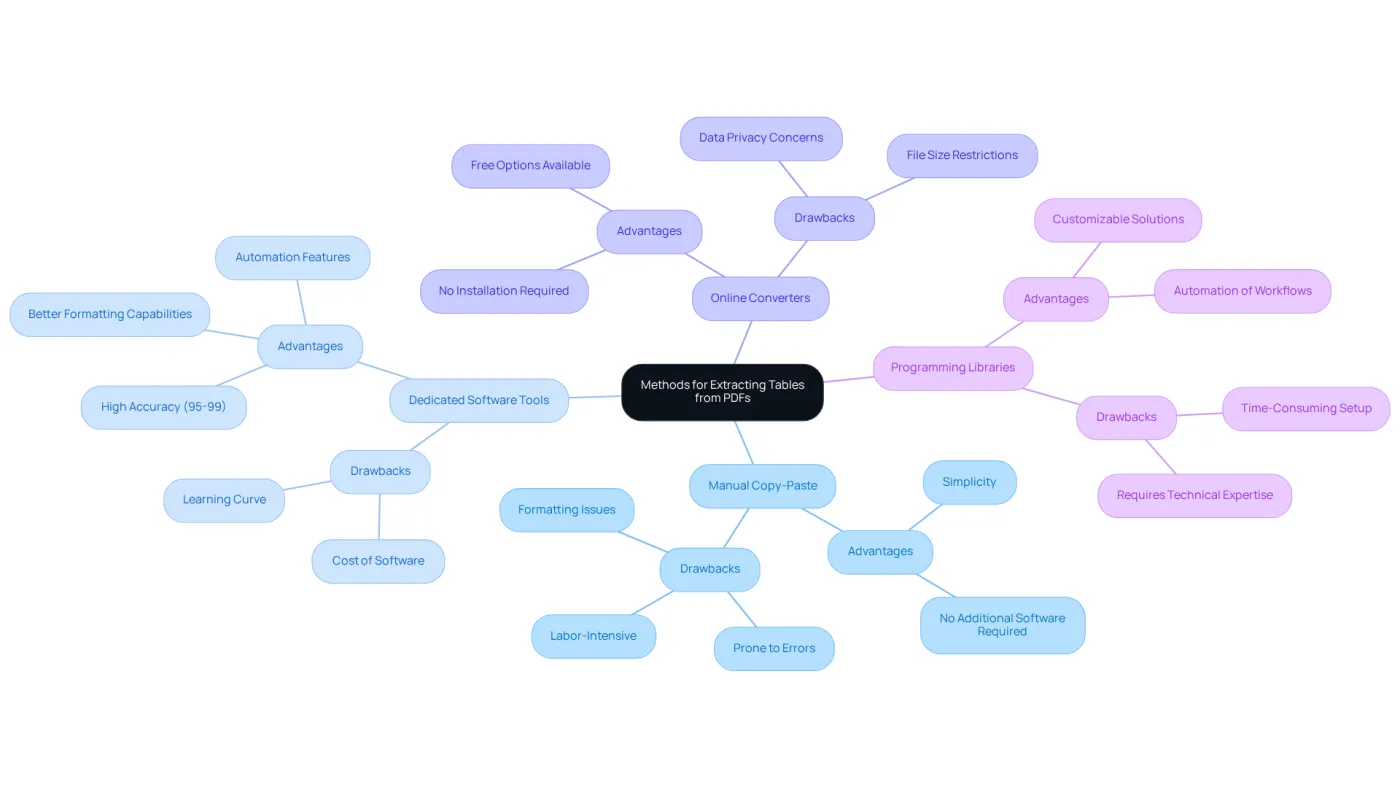
Extracting tables from PDFs presents a common challenge, but several effective methods can simplify this process, each with its own set of advantages and drawbacks:
-
Manual Copy-Paste: This straightforward method involves selecting the table in a PDF viewer, copying it, and pasting it into Excel. While simple, it can be labor-intensive and prone to errors, especially with larger tables where formatting issues may arise. Additionally, tools like Smallpdf often struggle with complex PDF documents, making this approach less reliable for intricate data.
-
Dedicated Software Tools: Leveraging tools such as Adobe Acrobat, Tabula, and VeryPDF Table Extractor can significantly enhance the ability to extract table from pdf to excel. These applications typically offer superior accuracy and formatting capabilities compared to manual methods, with leading platforms achieving accuracy levels between 95% and 99%. This reliability is crucial for users who demand consistent results, particularly as the information retrieval software market is projected to reach USD 3.99 billion by 2032, expanding at a CAGR of 9.8% from 2026 to 2032.
-
Online Converters: Services like Smallpdf and PDF to Excel Converter offer free online options for converting PDFs to Excel. However, these tools may impose file size restrictions and raise data privacy concerns, which can be problematic for sensitive information.
-
Programming Libraries: For those with technical expertise, libraries such as Camelot and pdfplumber in Python provide customizable solutions for data extraction. These libraries enable users to manage complex datasets and automate workflows, catering to advanced extraction needs.
Choosing the right method to extract table from pdf to excel depends on the complexity of the table structure, the volume of data, and the user's comfort level with technology. By understanding these options, you can select the most effective approach for your data extraction needs.
Implement Step-by-Step Extraction Techniques
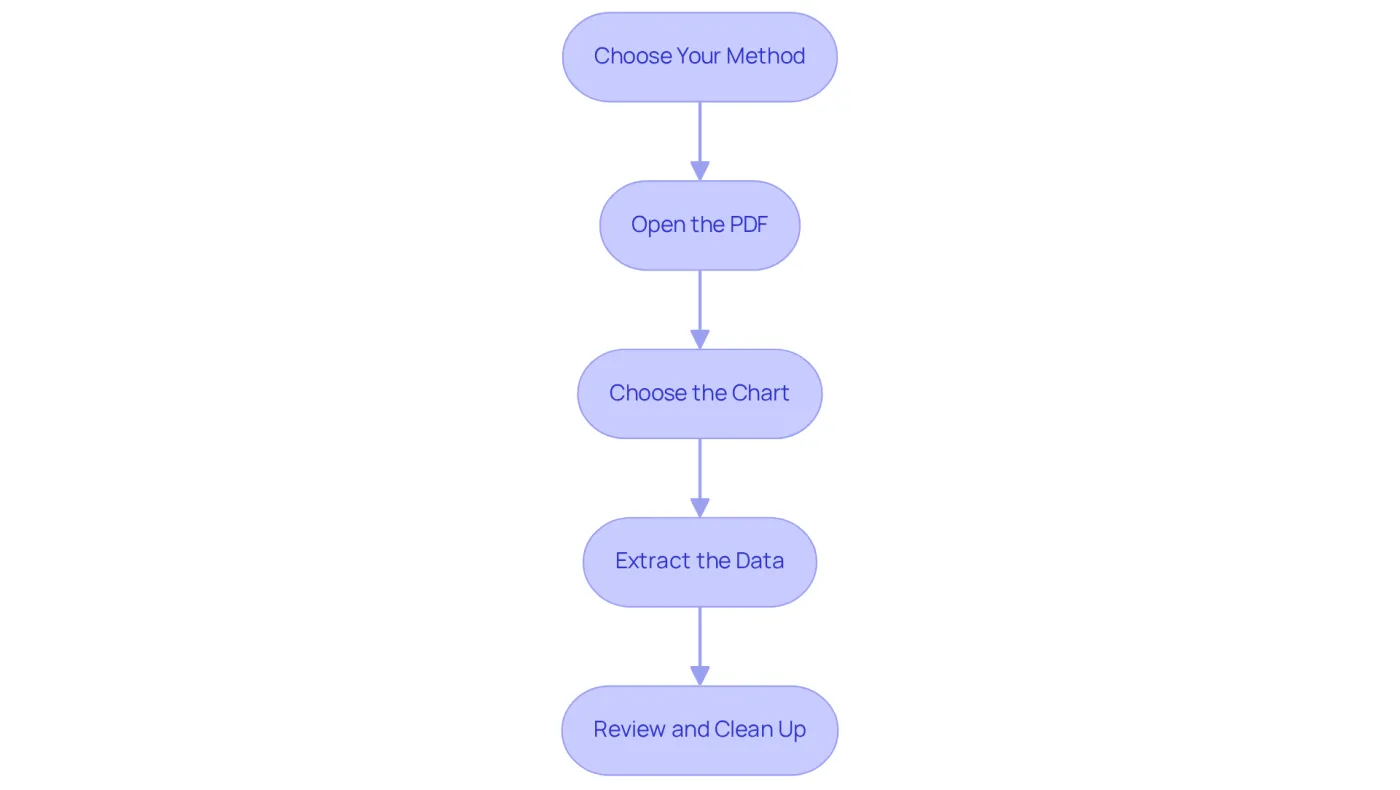
To extract a table from a PDF to Excel, follow these essential steps:
- Choose Your Method: Decide whether to use manual copy-paste, dedicated software, or a programming library based on your needs and technical skills.
- Open the PDF: If using software, open the PDF file in your chosen application (e.g., Adobe Acrobat). For online converters, simply upload the PDF to the website.
- Choose the Chart: If using manual methods, highlight the chart you wish to extract. For software tools, utilize the selection tool to outline the grid area.
- Extract the Data:
- Manual: Copy the selected data (Ctrl+C) and paste it into Excel (Ctrl+V).
- Software: Use the extraction feature to transform the dataset into Excel format, following the prompts provided by the tool.
- Programming: Write a script using a library like Camelot to read the PDF and extract the table information programmatically.
- Review and Clean Up: Once the information is in Excel, check for any formatting issues or errors. Adjust columns, remove unnecessary rows, and ensure the information is structured correctly.
By adhering to these steps, you can effectively extract table from pdf to excel and integrate the information into your spreadsheets seamlessly.
Troubleshoot Common Extraction Issues
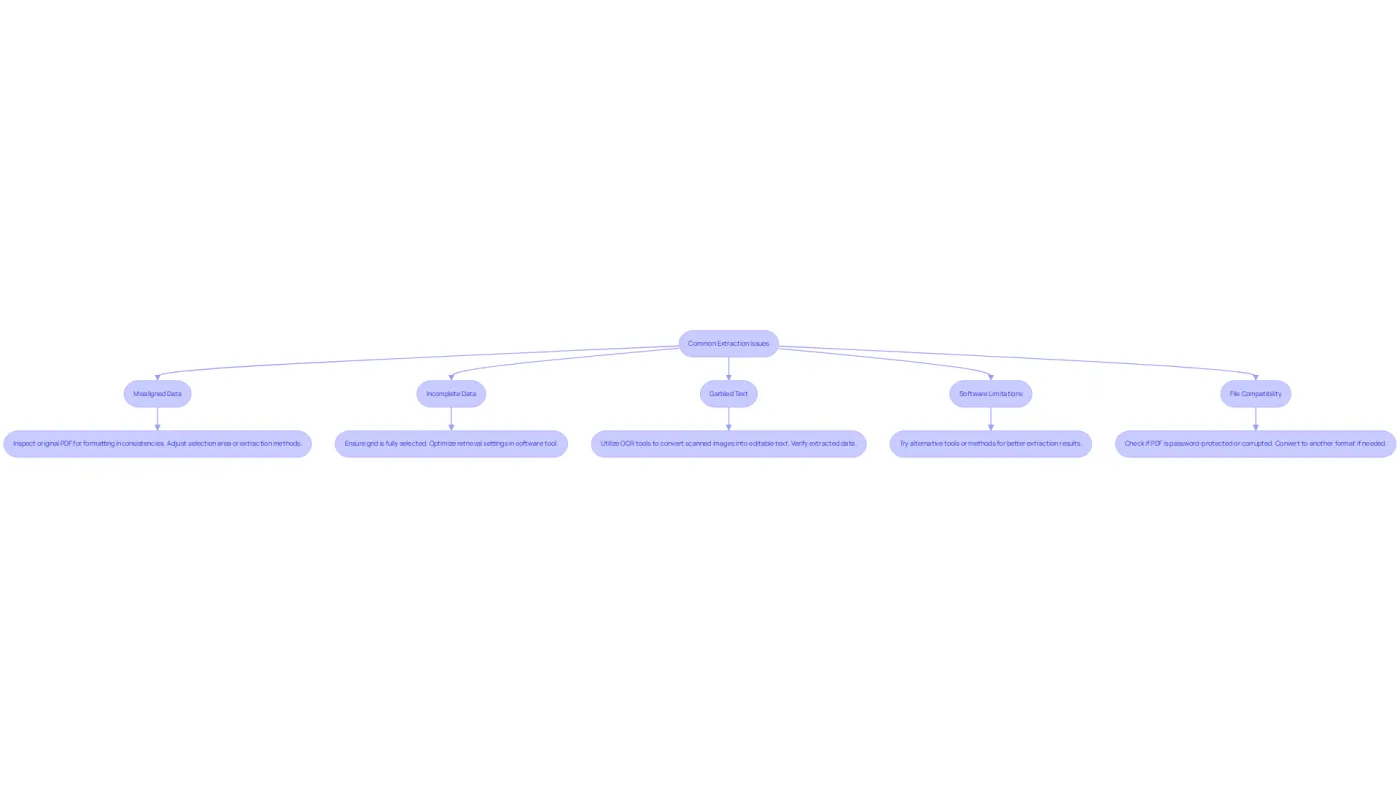
When you need to extract a table from PDF to Excel, you may encounter several common issues due to the inherent complexities of PDF formats. These include merged cells, inconsistent rows, and various styles. Here are some troubleshooting tips to enhance your extraction process:
- Misaligned Data: If the extracted data appears jumbled, inspect the original PDF for formatting inconsistencies. Adjust the selection area or experiment with different extraction methods to improve alignment. Remember, the challenges of PDF formats can complicate automation workflows, so careful attention to detail is crucial.
- Incomplete Data: Missing rows or columns can occur if the grid is not fully selected. Ensure that your retrieval settings are correctly configured in your software tool to extract a table from PDF to Excel. Automated PDF information retrieval tools can achieve accuracy rates of 95-99% in structured fields, making it essential to optimize your settings.
- Garbled Text: This issue frequently arises with scanned PDFs. Utilize Optical Character Recognition (OCR) tools to convert scanned images into editable text before extraction, significantly enhancing accuracy. However, be cautious of the risk of hard-to-spot mistakes as reliance on technology increases; always verify the extracted data.
- Software Limitations: If your current tool struggles to extract the table correctly, consider trying alternative tools or methods. Each removal tool has unique strengths, and experimenting can lead to enhanced results. A comprehensive approach to extract a table from PDF to Excel is often necessary to effectively address the various challenges.
- File Compatibility: Ensure that the PDF is not password-protected or corrupted, as these factors can obstruct retrieval. If needed, convert the PDF to another format before trying to retrieve information.
By grasping these typical obstacles and their remedies, you can simplify your retrieval process and attain more dependable outcomes. Addressing these issues is vital, as ignoring the nuances of PDF table formats can lead to significant real-world implications, such as costly errors in data extraction.
Conclusion
Mastering the extraction of tables from PDFs to Excel is crucial for anyone aiming to convert static data into dynamic, usable formats. This process not only enhances data manipulation capabilities but also streamlines workflows, making it easier to analyze and utilize information effectively.
In this article, we’ve explored various methods for extracting tables from PDFs, including:
- Manual copy-pasting
- Dedicated software tools
- Online converters
- Programming libraries
Each approach presents distinct advantages, from the simplicity of manual methods to the precision of specialized software, catering to diverse user needs and technical expertise. We’ve also addressed common issues such as misaligned data and incomplete extraction, providing troubleshooting tips to ensure successful outcomes.
Ultimately, understanding how to extract tables from PDFs transcends mere technical skill; it’s a vital capability in today’s data-driven landscape. By implementing the right techniques and tools, users can significantly enhance their data extraction processes, avoiding costly errors and boosting overall productivity. Embracing these strategies empowers individuals and organizations to harness the full potential of their data, leading to more informed decision-making and greater operational efficiency.
Frequently Asked Questions
What is PDF table extraction?
PDF table extraction is the process of converting tabular information from PDF documents into formats like Excel that are easier to manipulate.
Why is PDF table extraction challenging?
It is challenging because PDFs are designed for presentation rather than data manipulation, which can lead to misaligned columns and garbled text.
What is the first step to effective PDF table extraction?
The first step is understanding the structure of the PDF and the characteristics of the information contained within it.
What types of content can PDFs contain that complicate data extraction?
PDFs can contain a mix of text, images, and vector graphics, which complicates the extraction of structured data.
Why is it important to familiarize yourself with various data formats?
Familiarizing yourself with data formats like CSV and XLSX can significantly enhance your workflow and data analysis capabilities after extraction.
What are some methods for extracting information from PDFs?
Methods for extracting information include manual copy-pasting, using specialized software tools, and employing programming libraries.
How can understanding extraction techniques help in data manipulation?
Understanding different extraction techniques allows you to choose the most effective method for your needs, ultimately streamlining your data manipulation processes.