
Master How to Sort in Sheets: Essential Steps for Finance Pros
Master how to sort in sheets for improved organization and analysis of financial data.

Introduction
Arranging data in Google Sheets is a fundamental skill that can significantly enhance how finance professionals manage and analyze information. Mastering sorting techniques not only boosts clarity and efficiency but also empowers users to make informed decisions based on well-organized financial data. Yet, many professionals grapple with the complexities of sorting. What essential steps and advanced strategies can streamline this crucial process? Exploring these techniques can elevate productivity and provide deeper insights in financial reporting and analysis.
Understand the Importance of Sorting Data in Google Sheets
Unlocking the Power of Google Sheets for Finance Professionals
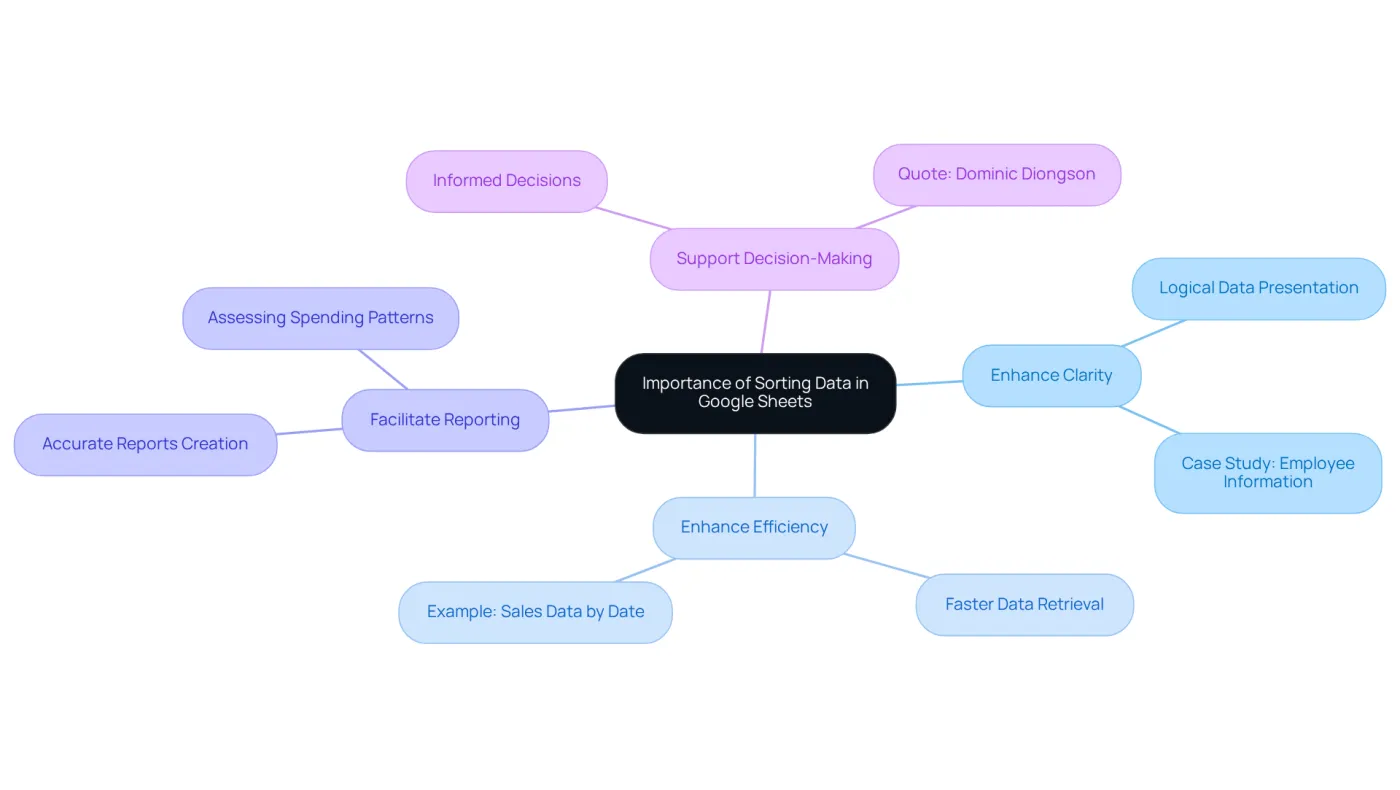
Arranging information in Google Sheets is not just a skill; it’s a vital asset for finance professionals. This capability significantly enhances the organization and analysis of financial details. By implementing effective sorting techniques, you can reap the following benefits:
- Enhance Clarity: Sorting presents data in a logical order, making it easier to identify trends and patterns. For instance, organizing employee information alphabetically simplifies monitoring personnel changes, ensuring essential details are readily accessible. A case study on this technique illustrates how it enhances comparison and insights.
- Enhance Efficiency: When information is organized, finding specific points becomes faster and more direct, conserving precious time during analysis. This efficiency is crucial in fast-paced economic environments where timely insights can drive strategic decisions. For example, organizing sales information by date allows analysts to showcase trends over time, improving the clarity of financial reports.
- Facilitate Reporting: Well-structured information is essential for creating accurate reports and presentations, which are critical in finance. Professionals can quickly assess spending patterns and identify areas for cost reduction by understanding how to sort in sheets, such as expenses by category.
- Support Decision-Making: Sorting empowers finance professionals to make informed decisions based on clear and accessible information. As industry leaders emphasize, a clear system that arranges information effectively is essential for meaningful economic analysis. Dominic Diongson notes, "Utilizing SORT and SORTN effectively necessitates a comprehension of best practices to enhance information organization and minimize mistakes."
Mastering how to sort in sheets goes beyond aesthetics; it profoundly impacts your ability to manage and analyze monetary information effectively. Incorporating these practices can lead to enhanced productivity and clarity in economic analysis. Take action now-start refining your data organization skills today!
Follow Basic Steps to Sort Data in Google Sheets
Understanding how to sort in sheets is crucial for organizing information in Google Sheets for effective financial reporting and analysis. Are you struggling to streamline your workflow? The ShortieCuts extension offers a powerful solution, integrating 233 Excel ALT shortcuts to enhance your efficiency. Follow these straightforward steps to organize your data effectively:
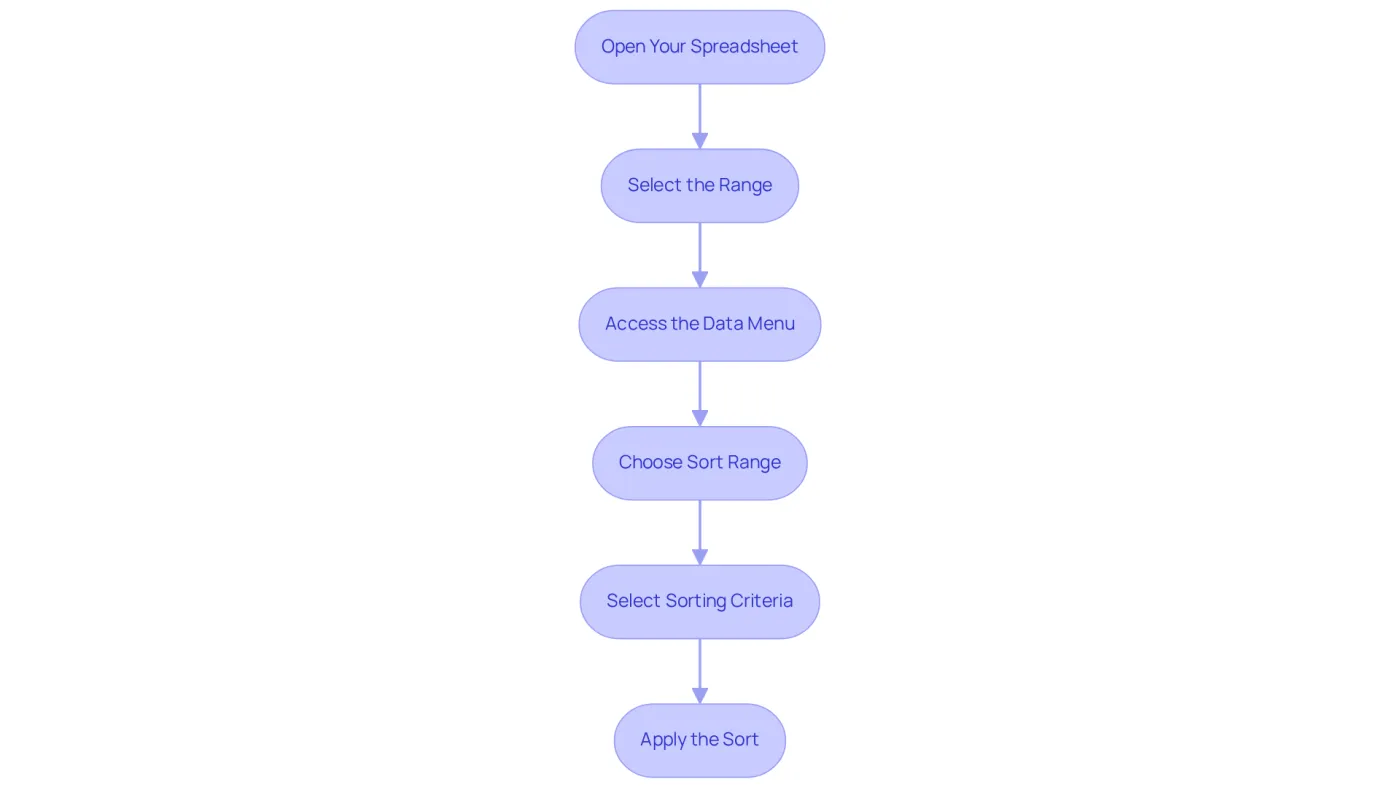
- Open Your Spreadsheet: Launch Google Sheets and access the document containing your information.
- Select the Range: Highlight the cells you wish to sort, ensuring all relevant columns are included to maintain information integrity. For example, using keyboard shortcuts like
Ctrl + Shift + →andCtrl + Shift + ↓on Windows, orCommand + Shift + →andCommand + Shift + ↓on Mac, allows for swift selection of entire blocks of information. With ShortieCuts, simply hit "ALT" (or Option on Mac) to view key-tips that can further streamline your selection process. - Access the Data Menu: Click on the 'Data' option in the top menu bar.
- Choose Sort Range: Select 'Sort range' from the dropdown menu. If your information includes headers, check the box labeled 'Information has header row' to understand how to sort in sheets without mixing headers into the sort.
- Select Sorting Criteria: Choose the column you want to sort by and specify whether to sort in ascending (A-Z) or descending (Z-A) order. For instance, organizing by date can assist in recognizing trends in financial information.
- Apply the Sort: Click 'Sort' to apply your changes. Your information will now be organized according to your specified criteria, demonstrating how to sort in sheets for enhanced clarity and accessibility.
Additionally, consider using the right-click method for quick organizing without navigating through menus. This can significantly enhance your workflow efficiency. Remember, maintaining consistent headers is crucial for data integrity during arrangement. By mastering these techniques, finance professionals can greatly improve their productivity, as evidenced by a 75% increase reported by users who have adopted these organizing features. Moreover, employing the SORT function enables dynamic arrangement that updates automatically, which is especially beneficial for handling large datasets. With ShortieCuts, you can enjoy a user-friendly experience while ensuring your data remains private and secure, as everything runs locally on your computer.
Implement Advanced Sorting Techniques for Enhanced Efficiency
Once you're comfortable with basic sorting, it's time to elevate your efficiency with advanced techniques:
-
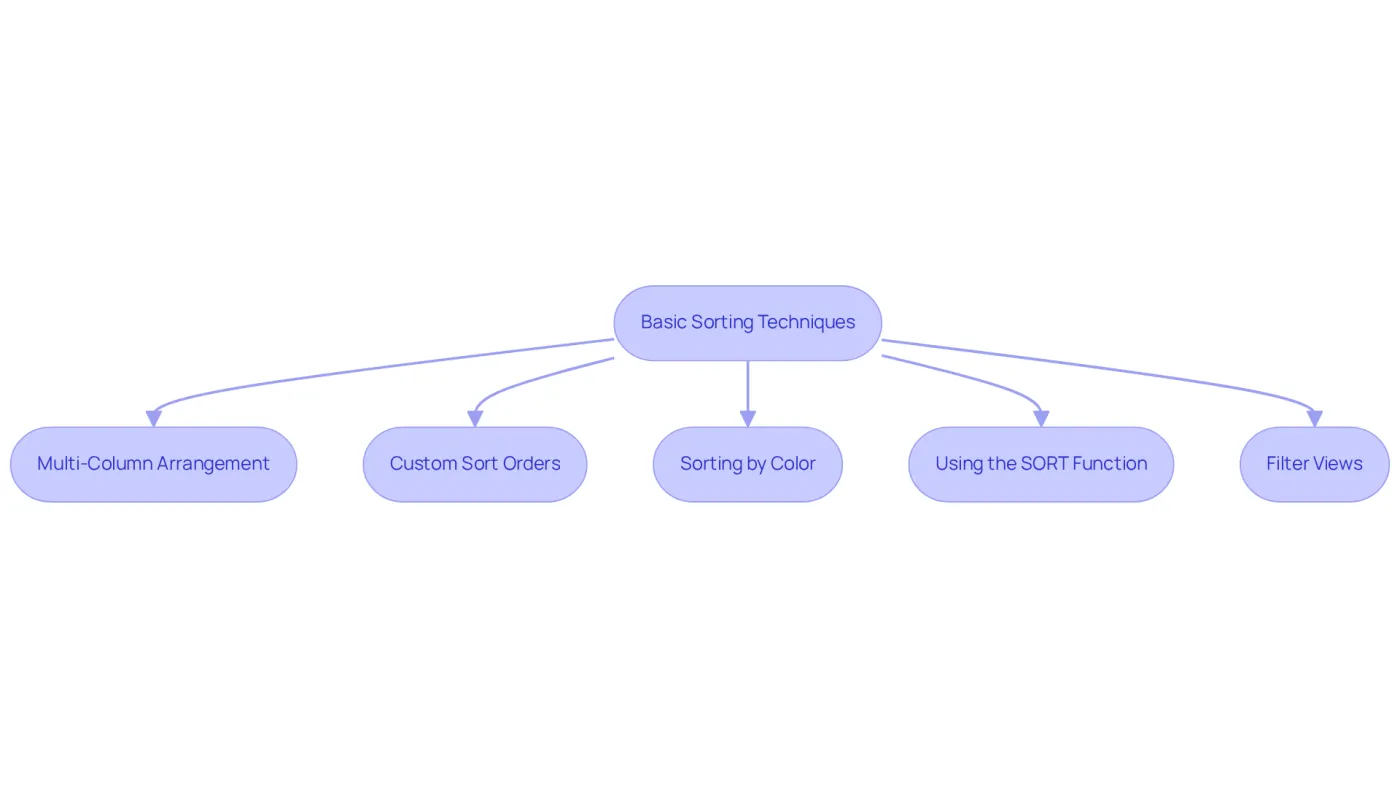
Multi-Column Arrangement: Want to arrange by multiple columns? Simply choose 'Sort range' and add extra criteria to learn how to sort in sheets. For instance, learning how to sort in sheets can involve first sorting by 'Date' and then by 'Amount' to analyze transactions both chronologically and by value.
-
Custom Sort Orders: Do you need to learn how to sort in sheets to achieve a specific arrangement, such as organizing months in chronological order? To maintain your desired sequence, learn how to sort in sheets by creating a custom list in Google Sheets and applying it during the sorting process.
-
Sorting by Color: Organize rows based on cell or text color to highlight specific categories or statuses in your financial data. This makes it easier to spot trends or crucial details at a glance.
-
Using the SORT Function: This is an example of how to sort in sheets by leveraging the SORT function in a formula. For example,
=SORT(A2:B10, 1, TRUE)illustrates how to sort in sheets by arranging the specified range according to the first column in ascending order, allowing for real-time updates as your information changes. -
Filter Views: Create filter views to understand how to sort in sheets and analyze information without altering the original dataset. This feature is particularly beneficial in collaborative environments, enabling multiple users to view information differently without interference.
These advanced techniques empower you to manage and analyze your financial information more effectively, leading to deeper insights and informed decision-making.
Troubleshoot Common Sorting Issues in Google Sheets
Even seasoned finance professionals find it challenging to learn how to sort in sheets when organizing information in Google Sheets. Here are some common issues you might face, along with effective solutions, particularly when leveraging ShortieCuts to enhance your experience with Excel-style shortcuts:
-
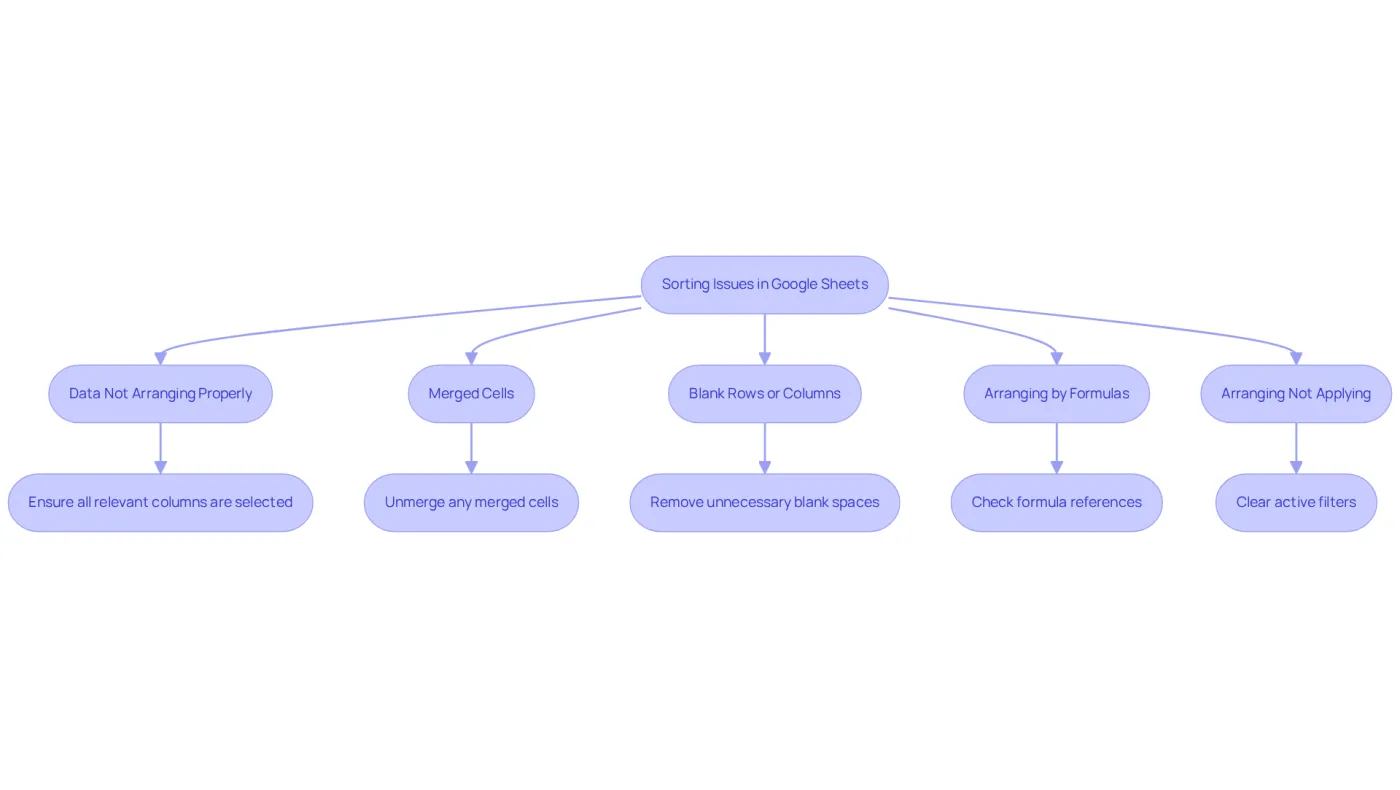
Data Not Arranging Properly: Always ensure that all relevant columns are selected when organizing. If you don't know how to sort in sheets, sorting a single column can misalign your data, leading to confusion. With ShortieCuts, you can quickly access Excel-style shortcuts to streamline this process.
-
Merged Cells: Merged cells can disrupt the arrangement process. To avoid errors, it is important to know how to sort in sheets by unmerging any cells within the range you intend to sort. ShortieCuts simplifies navigation and management of merged cells, ensuring a smoother organization experience.
-
Blank Rows or Columns: Empty rows or columns can disrupt your arrangement. Before learning how to sort in sheets, remove unnecessary blank spaces in your dataset to maintain order. Utilizing ShortieCuts helps you quickly identify and eliminate these spaces.
-
Arranging by Formulas: When organizing data that contains formulas, ensure that the formulas point to the correct cells. Incorrect references can yield unexpected results, complicating your analysis. ShortieCuts enhances your ability to handle formulas efficiently, ensuring precise organization.
-
Arranging Not Applying: If your arrangement seems to revert, check for any active filters and consider learning how to sort in sheets. Clear these filters before attempting to sort again to ensure your information is organized as intended. ShortieCuts offers an intuitive interface that streamlines filter management and organization.
Understanding these common organization challenges and their solutions can help finance experts maintain an efficient workflow, ensuring that financial information remains structured and readily accessible. As one finance expert noted, "Sorting data in Google Sheets might seem like a simple task, but anyone who's tried to make sense of a jumbled mess of numbers and names knows it's anything but." Additionally, a user faced challenges while sorting trivia participant scores and discovered that directly clicking the column label resolved the issue, highlighting the importance of using the right approach.
Conclusion
Mastering the art of sorting data in Google Sheets is not just a skill; it’s a necessity for finance professionals. This essential capability enhances data organization and significantly boosts analysis and decision-making prowess. A well-structured dataset provides clearer insights, enabling finance experts to swiftly identify trends, streamline reporting, and make informed decisions. By implementing effective sorting techniques, finance professionals can fully harness their data's potential, leading to increased productivity and clarity.
This guide has highlighted key points, emphasizing the importance of sorting for clarity, efficiency, and effective reporting. You’ve been provided with step-by-step instructions for basic sorting, advanced techniques like multi-column arrangements, and custom sort orders, along with solutions to common sorting issues. These insights equip finance professionals with the necessary tools to manage their data efficiently, ultimately enhancing financial analysis and reporting.
The significance of mastering sorting techniques in Google Sheets cannot be overstated. As the finance landscape evolves, the ability to organize and analyze data effectively becomes increasingly crucial. Embracing these practices will not only improve individual workflows but also foster a culture of efficiency and precision within financial teams. Now is the time to take action-refine your sorting skills today and witness the profound impact it can have on your financial data management and analysis.
Frequently Asked Questions
Why is sorting data in Google Sheets important for finance professionals?
Sorting data in Google Sheets is crucial for finance professionals as it enhances the organization and analysis of financial details, making it easier to identify trends, improve efficiency, facilitate reporting, and support informed decision-making.
How does sorting enhance clarity in data presentation?
Sorting presents data in a logical order, which helps in identifying trends and patterns more easily. For example, organizing employee information alphabetically allows for better monitoring of personnel changes and makes essential details readily accessible.
In what ways does sorting improve efficiency during data analysis?
When information is organized, it allows for faster and more direct access to specific points, saving time during analysis. This efficiency is particularly important in fast-paced economic environments where timely insights are needed for strategic decisions.
How does sorting facilitate reporting in finance?
Well-structured information is essential for creating accurate reports and presentations. By sorting data, such as expenses by category, finance professionals can quickly assess spending patterns and identify areas for cost reduction.
What role does sorting play in supporting decision-making for finance professionals?
Sorting empowers finance professionals to make informed decisions by providing clear and accessible information. A well-organized system is essential for meaningful economic analysis, as noted by industry leaders.
What are some best practices for sorting data in Google Sheets?
Best practices for sorting data include understanding how to effectively use functions like SORT and SORTN to enhance information organization and minimize mistakes, as emphasized by experts in the field.