
Merge XLSX Files: Step-by-Step Guide for Finance Professionals
Learn how finance professionals can efficiently merge XLSX files for enhanced data management.

Introduction
Merging XLSX files is more than just a technical task; it’s an essential skill for finance professionals who need to integrate diverse data sources into cohesive datasets. Mastering this competency not only enhances data accuracy but also improves workflow efficiency and fosters collaboration across teams. Yet, the process can present significant challenges, including inconsistent data formats and potential errors during merging.
So, how can finance experts streamline their approach? By adopting effective strategies, they can fully leverage the benefits of data consolidation while steering clear of common pitfalls. This article will explore practical solutions that empower analysts to navigate these challenges with confidence.
Understand the Importance of Merging XLSX Files
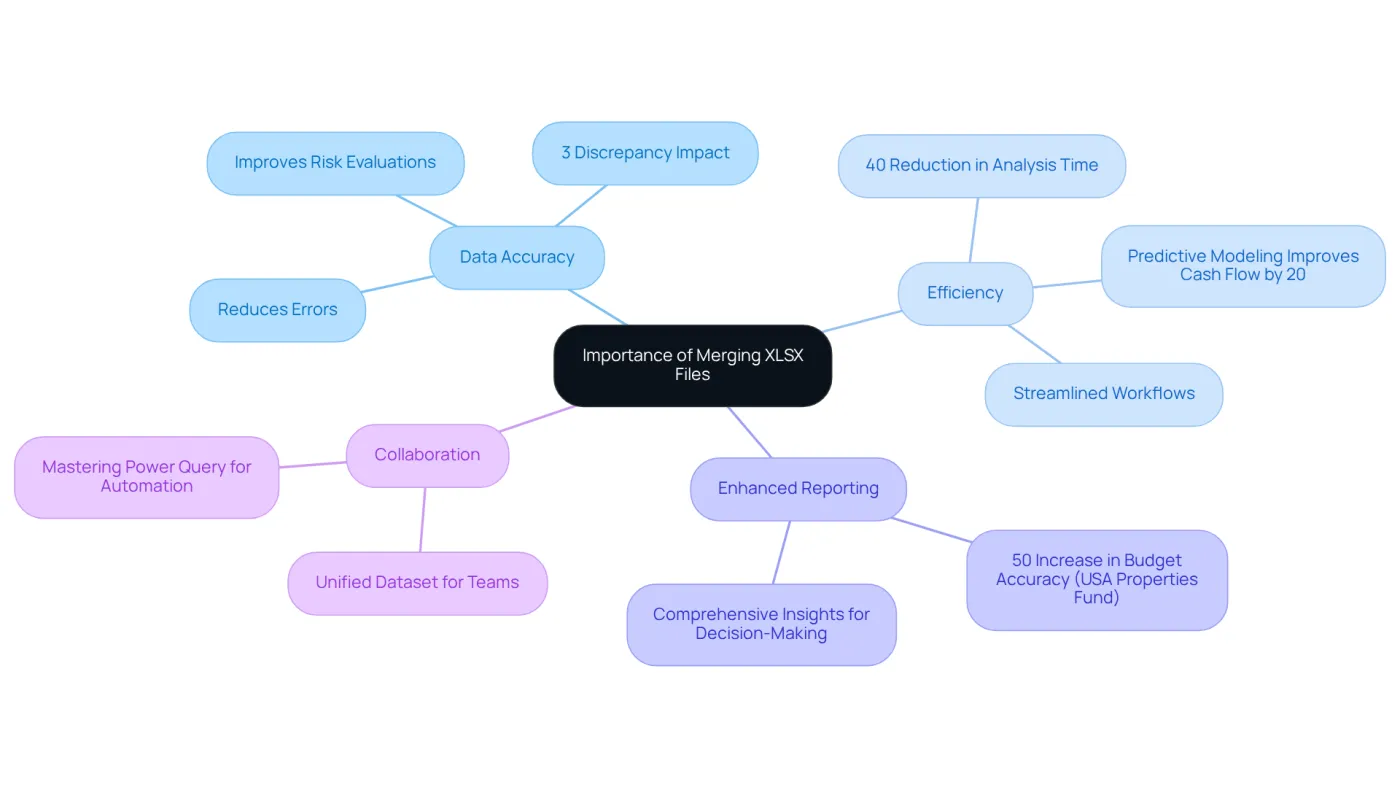
Combining XLSX documents is an essential skill for finance experts, as they often need to merge XLSX files to integrate information from various sources into a unified dataset. This capability is vital for several reasons:
-
Data Accuracy: Merging files reduces the risk of errors that can occur when managing multiple datasets separately. A single consolidated file guarantees that all relevant information is included and accurately aligned, which is crucial for effective financial planning. For instance, organizations that prioritize data accuracy can enhance decision-making and manage risks more effectively, ultimately safeguarding their financial health. A minor discrepancy, such as a 3% error in industrial metrics, can have a significant impact on financial planning, underscoring the necessity for precision.
-
Efficiency: Merging XLSX files streamlines workflows, which allows analysts to concentrate on analysis rather than data collection. This is particularly critical in finance, where timely insights can greatly influence strategic decisions. Businesses that have embraced advanced data tools have reported a 40% reduction in analysis time, illustrating the efficiency gains from effective data consolidation. Additionally, predictive modeling has been shown to improve cash flow management by 20%, further emphasizing the importance of accurate information.
-
Enhanced Reporting: A consolidated dataset supports comprehensive reporting and analysis, enabling finance professionals to derive insights that guide strategic decisions. For example, the USA Properties Fund achieved a 50% increase in budget accuracy through improved data management, highlighting the advantages of effective data consolidation.
-
Collaboration: To simplify information sharing among colleagues and stakeholders, we can merge XLSX files, ensuring that everyone works from the same dataset. This collaborative approach fosters better communication and alignment within teams, ultimately boosting overall productivity. Furthermore, mastering tools like Power Query can automate combining tasks, making the process even more efficient.
By recognizing these benefits, finance professionals can appreciate the significance of mastering the process to merge XLSX files, leading to enhanced productivity and more informed decision-making.
Explore Methods to Merge XLSX Files
Merging XLSX files can be a daunting task, but several methods exist to simplify the process, each with unique advantages tailored to different needs:
-
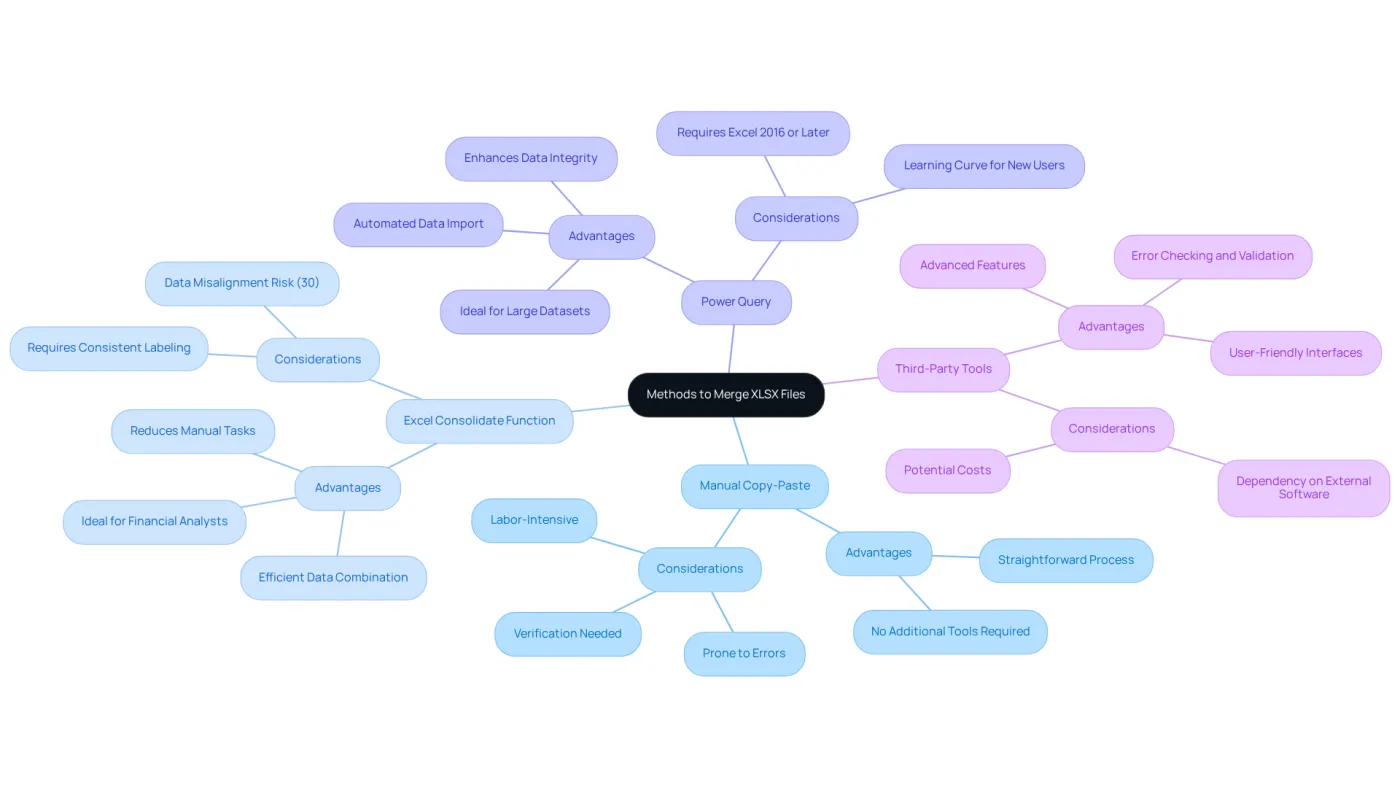
Manual Copy-Paste: This straightforward method involves opening each file, copying the relevant data, and pasting it into a master file. While easy to grasp, it can be labor-intensive and prone to errors, especially with large datasets. It’s essential to verify references after merging to prevent workflow disruptions, as highlighted by analyst Paul Warburg.
-
Excel Consolidate Function: Excel’s built-in Consolidate feature efficiently combines information from multiple sheets into a single summary table. To access this feature, navigate to the Data tab and select Consolidate from the Data Tools group. This method is particularly beneficial for financial analysts aggregating data from various sources, such as departmental budgets into a company-wide budget. Proper setup is crucial; consistent labeling across datasets is vital for successful consolidation, as information misalignment occurs in about 30% of Excel combinations. This function can significantly streamline the merging process, reducing time spent on manual tasks.
-
Power Query: For those seeking a more automated solution, Power Query offers robust functionalities for combining information. This tool allows users to import and convert data from various documents into a single table, making it ideal for managing large datasets. Power Query not only streamlines the combination process but also enhances data integrity by minimizing errors associated with manual techniques.
Numerous third-party tools and applications focus on how to merge XLSX files. These tools often come equipped with advanced features like error checking and data validation, further simplifying the merging process and ensuring accuracy.
By evaluating these methods, finance professionals can choose the most effective approach that aligns with their workflow and technical skills, ultimately enhancing their data management efficiency.
Follow Step-by-Step Instructions to Merge XLSX Files
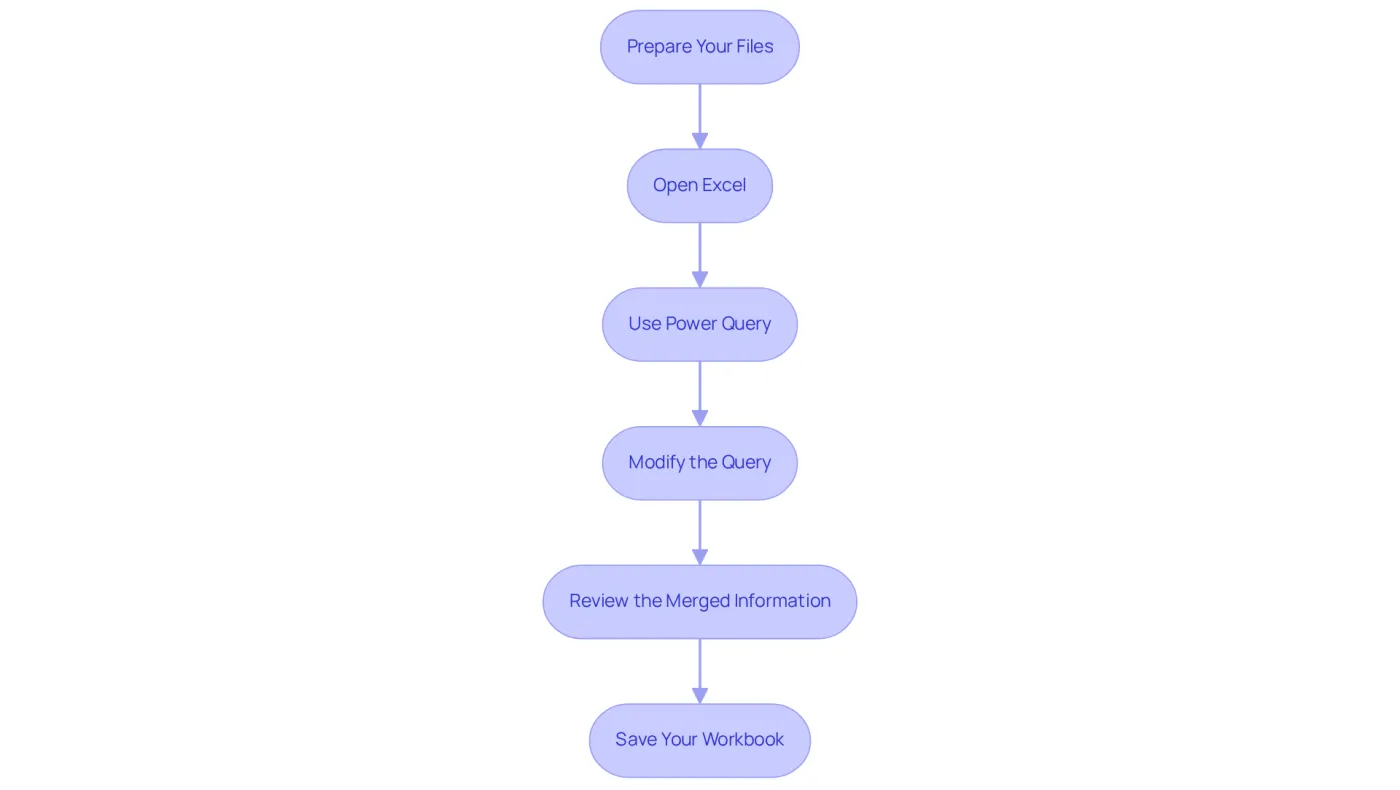
To merge XLSX files effectively, follow these step-by-step instructions:
-
Prepare Your Files: Gather all XLSX files you plan to combine into a single folder. Ensure they have a consistent structure, including matching headers and data types. This uniformity is crucial for seamless integration. Convert any formulas to values before merging to avoid broken references. Additionally, consider using the Remove Duplicates feature or the UNIQUE() function to prevent duplicate entries.
-
Open Excel: Launch Microsoft Excel and create a new workbook designated for consolidating the data.
-
Use Power Query:
- Navigate to the Data tab and select Get Data > From File > From Folder.
- Locate the folder containing your XLSX documents and click OK.
- In the Navigator window, select the files you wish to merge and click Combine.
-
Modify the Query: Power Query will display a new window for adjustments. Verify that the information is formatted correctly, making any necessary changes before clicking Close & Load to import it into your new workbook.
-
Review the Merged Information: After loading, meticulously examine the information for accuracy and completeness. Make adjustments as needed to ensure the dataset is primed for analysis. Validate the information and optimize performance by checking for total row counts, missing columns, and formatting consistency.
-
Save Your Workbook: Finally, save your new workbook with a descriptive name for easy identification in the future.
By following these steps, finance professionals can efficiently merge XLSX files to create a comprehensive dataset, significantly enhancing their analysis capabilities. Additionally, consider participating in events such as FabCon Atlanta from March 16-20, 2026, to further improve your skills in managing information.
Troubleshoot Common Issues When Merging XLSX Files
When users merge XLSX files, they often encounter several common challenges. Here are some troubleshooting tips to streamline the process:
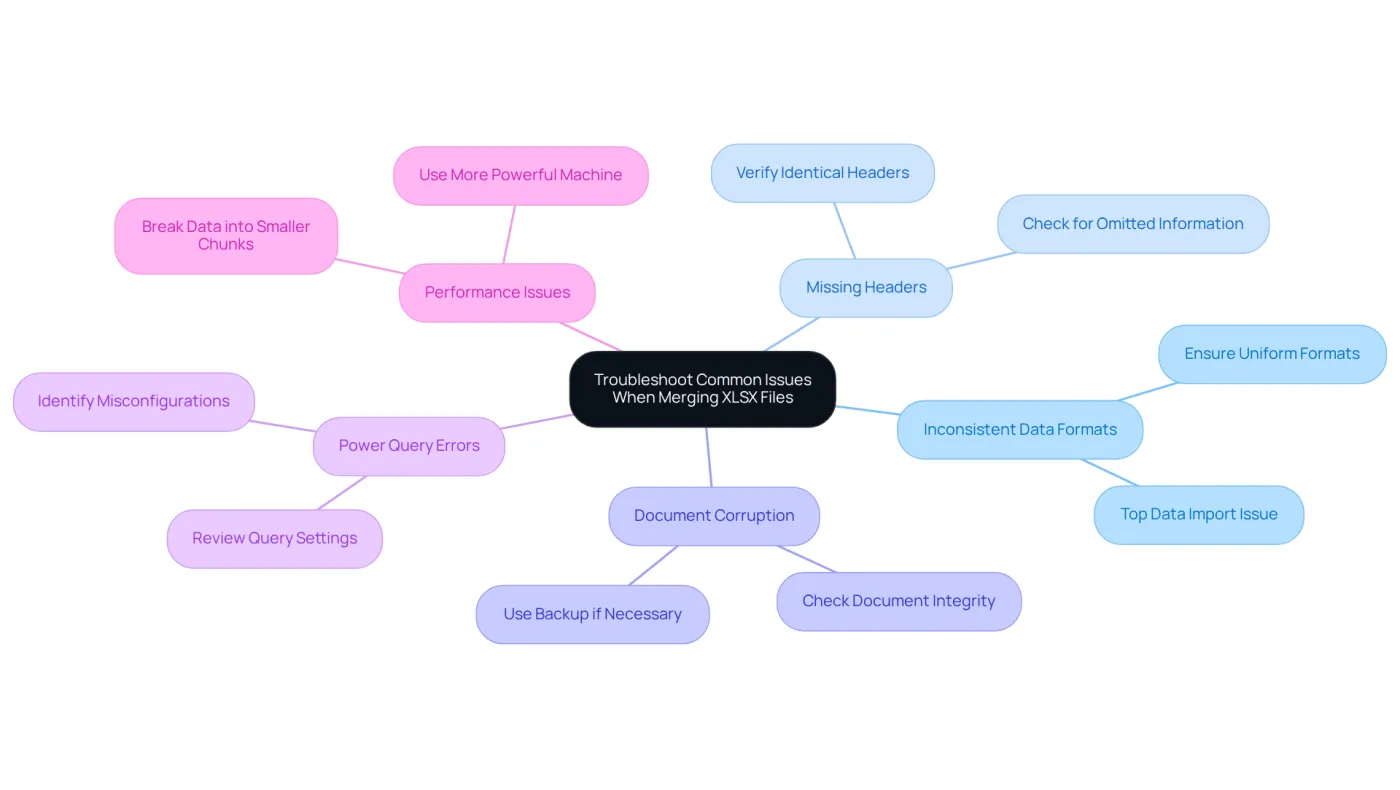
- Inconsistent Data Formats: It's crucial to ensure that all files maintain uniform data formats, such as date and number formats. Inconsistent formats can lead to errors during merging. Statistics indicate that format mismatches rank among the top six data import issues in financial datasets. Excel import errors can significantly hinder the onboarding process, ultimately impacting productivity.
- Missing Headers: Verify that all documents contain identical headers. An absent header in any document can cause misalignment in the combined information, complicating analysis and reporting. Omitted information is one of the most frequent mistakes in Excel imports, underscoring the importance of confirming that all documents are complete before you merge xlsx files.
- Document Corruption: If a document fails to open or merge, it may be corrupted. Access the document individually to check for issues, and consider using a backup if available to prevent data loss.
- Power Query Errors: When using Power Query, ensure that the query settings are correctly configured. Review the steps in the query editor to identify any misconfigurations that could lead to import errors. As Roby Hyde notes, the complexity of Excel files with metadata can impede import efforts, making it essential to verify correct settings.
- Performance Issues: Merging large datasets can slow down Excel. If performance becomes a concern, consider breaking the data into smaller chunks or using a more powerful machine to enhance processing speed.
By understanding these common issues and their solutions, finance professionals can navigate the process to merge xlsx files more smoothly and efficiently, ultimately boosting their productivity.
Conclusion
Merging XLSX files is a crucial skill for finance professionals, allowing them to consolidate information from various sources into a single, coherent dataset. This capability enhances data accuracy and efficiency, facilitating better reporting and collaboration within teams. By mastering the techniques outlined, finance experts can ensure their analysis is built on a solid foundation of reliable data.
The importance of merging XLSX files cannot be overstated. It leads to improved decision-making, streamlined workflows, and enhanced communication. Methods such as:
- Manual copy-paste
- Excel's Consolidate function
- Power Query
offer tailored options for different needs and technical skills. Moreover, troubleshooting common issues ensures that potential obstacles do not hinder the merging process, allowing professionals to maintain productivity and uphold data integrity.
Ultimately, embracing the practice of merging XLSX files is essential for finance professionals aiming to elevate their data management capabilities. By implementing the best practices and methods discussed, individuals can enhance their analytical processes and contribute to more informed strategic decisions within their organizations. Investing time in refining these skills will lead to a more efficient and accurate approach to financial analysis, paving the way for success in an increasingly data-driven landscape.
Frequently Asked Questions
Why is merging XLSX files important for finance experts?
Merging XLSX files is important for finance experts because it allows them to integrate information from various sources into a unified dataset, which enhances data accuracy, streamlines workflows, supports enhanced reporting, and fosters collaboration.
How does merging XLSX files improve data accuracy?
Merging XLSX files reduces the risk of errors that can occur when managing multiple datasets separately. A consolidated file ensures that all relevant information is included and accurately aligned, which is crucial for effective financial planning.
What impact can a minor discrepancy in data have on financial planning?
A minor discrepancy, such as a 3% error in industrial metrics, can significantly impact financial planning, underscoring the necessity for precision in data management.
In what ways does merging XLSX files enhance efficiency for finance professionals?
Merging XLSX files streamlines workflows, allowing analysts to focus on analysis rather than data collection. Businesses that utilize effective data consolidation have reported a 40% reduction in analysis time.
How does data consolidation affect cash flow management?
Effective data consolidation, including merging XLSX files, has been shown to improve cash flow management by 20%, highlighting the importance of accurate information.
What benefits does enhanced reporting provide to finance professionals?
Enhanced reporting, supported by a consolidated dataset, enables finance professionals to derive insights that guide strategic decisions, leading to improved budget accuracy and overall financial management.
How does merging XLSX files facilitate collaboration among teams?
Merging XLSX files simplifies information sharing among colleagues and stakeholders, ensuring that everyone works from the same dataset. This approach fosters better communication and alignment within teams.
What tools can help automate the merging of XLSX files?
Tools like Power Query can automate the merging tasks, making the process of combining XLSX files more efficient for finance professionals.