
Buy ShortieCuts Chrome Extension: Boost Your Google Sheets Productivity
Easily buy ShortieCuts Chrome extension to enhance your Google Sheets productivity today!

Introduction
Unlocking the full potential of Google Sheets requires more than just basic skills; it demands tools that enhance efficiency and streamline workflows. Enter the ShortieCuts Chrome extension - a powerful ally that offers a suite of features designed to transform your interaction with spreadsheets. But with countless extensions available, how do you choose the right tool and effectively integrate it into your daily tasks?
This guide will walk you through the straightforward process of purchasing and installing ShortieCuts. You’ll discover how it can significantly boost your productivity while addressing common challenges you might face along the way. Get ready to elevate your spreadsheet game!
Purchase the ShortieCuts Chrome Extension
Unlock the Power of ShortieCuts: A Step-by-Step Guide to Purchase
To enhance your productivity in Google Sheets, purchasing the ShortieCuts Chrome extension is a straightforward process. Follow these steps to get started:
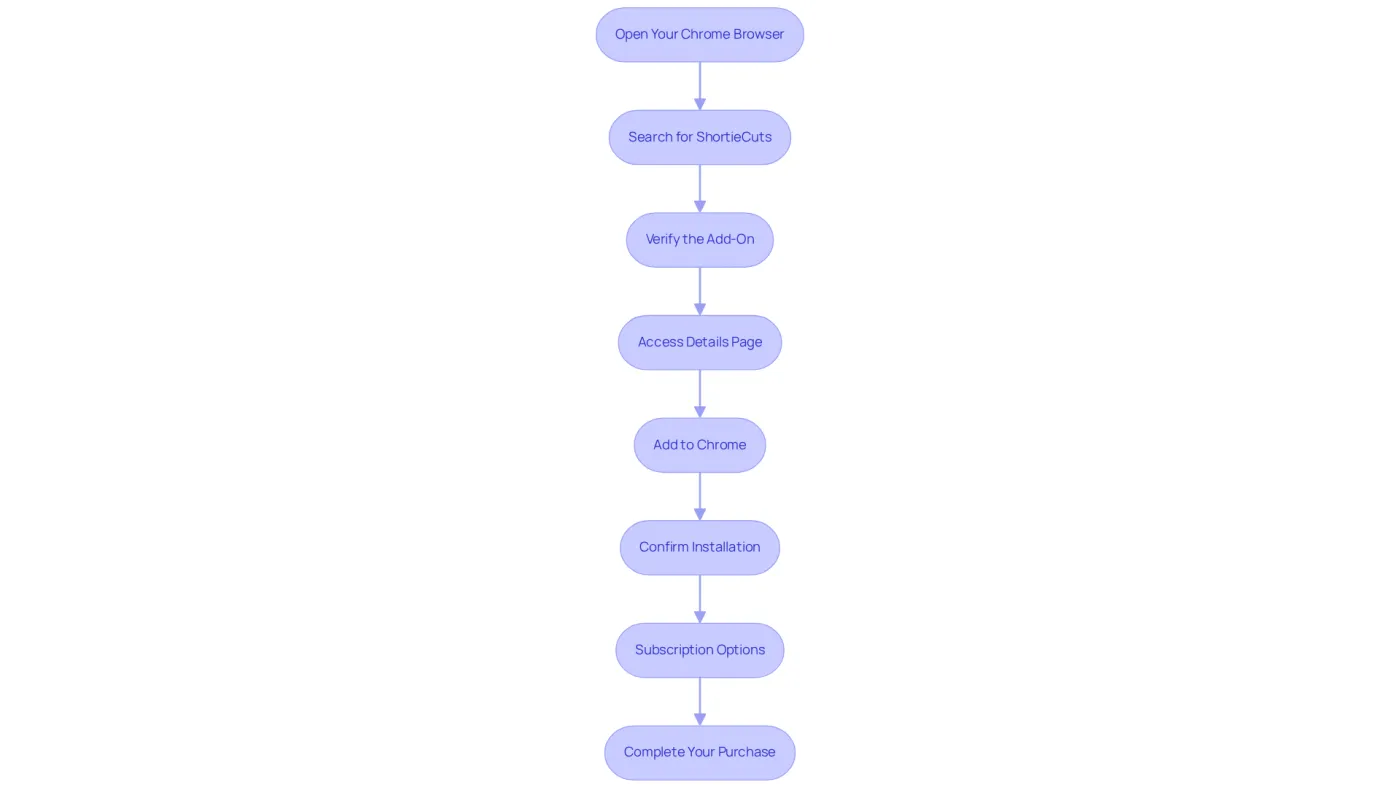
- Open Your Chrome Browser: Begin by navigating to the Chrome Web Store.
- Search for ShortieCuts: In the search bar, type 'ShortieCuts' and press Enter.
- Verify the Add-On: Locate the ShortieCuts add-on in the search results. Confirm its legitimacy by reviewing the description and user ratings.
- Access Details Page: Click on the add-on to view its details page.
- Add to Chrome: Select the 'Add to Chrome' button. A confirmation pop-up will appear.
- Confirm Installation: Click 'Add feature' to confirm the installation.
- Subscription Options: After setup, you may need to purchase a subscription or activate options based on the pricing structure displayed on the add-on page.
- Complete Your Purchase: Follow any additional prompts to finalize your purchase, ensuring you have a valid payment method ready.
By completing these steps, you will gain access to the full suite of features that ShortieCuts offers, significantly enhancing your productivity in Google Sheets. As of 2026, the average cost for browser add-ons typically ranges from $5 to $50, reflecting the value they provide in simplifying tasks and boosting efficiency.
Take Action Now: Don’t miss out on the opportunity to streamline your workflow. You can buy ShortieCuts Chrome extension today and experience the difference it can make in your daily tasks!
Install the ShortieCuts Extension in Chrome
Unlock the Power of ShortieCuts for Google Sheets
Installing the ShortieCuts extension in Chrome is your gateway to 233 Excel ALT shortcuts for Google Sheets. Follow these straightforward steps to enhance your productivity:
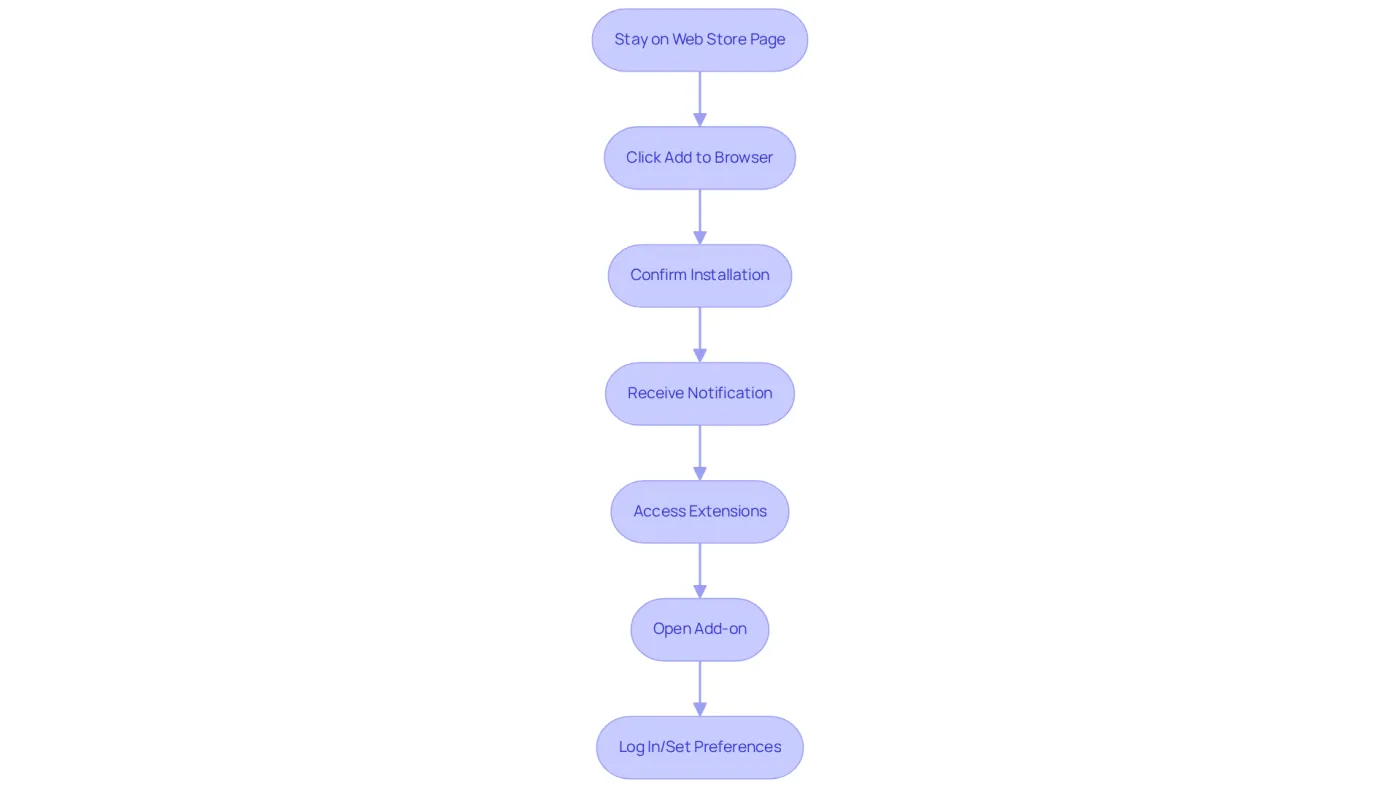
- After purchasing, remain on the Web Store page for ShortieCuts.
- If prompted, click the 'Add to Browser' button again.
- A confirmation dialog will appear; click 'Add' to proceed with the installation.
- Once the setup is complete, a notification will confirm that the application is integrated into your browser.
- To access the add-on, click the puzzle piece icon (Extensions) in the top right corner of your web browser.
- Locate the application in the dropdown menu and click on it to open the add-on.
- You may need to log in or set up your preferences for optimal functionality.
By completing this installation, you will effectively buy ShortieCuts Chrome extension, ensuring that it is fully incorporated into your web browser and significantly improving your efficiency in Google Sheets with advanced features and Excel-like shortcuts. With over 110,000 add-ons available for Chrome, this process is remarkably simple when you follow the specified steps.
User experiences reveal that those who adhere to these best practices enjoy a seamless transition to utilizing the powerful features of ShortieCuts. Furthermore, the 'Last Updated' timestamp on Chrome extensions serves as a reliable indicator of how actively the extension is maintained, assuring users of its reliability and commitment to local data privacy.
Take Action Now!
Don't miss out on the opportunity to streamline your workflow. If you want to experience the difference, make sure to buy ShortieCuts Chrome extension today!
Utilize ShortieCuts Features for Enhanced Productivity
Maximize Your Productivity with ShortieCuts
To truly enhance your productivity with ShortieCuts, it’s essential to leverage its key features effectively. Here’s how:
-
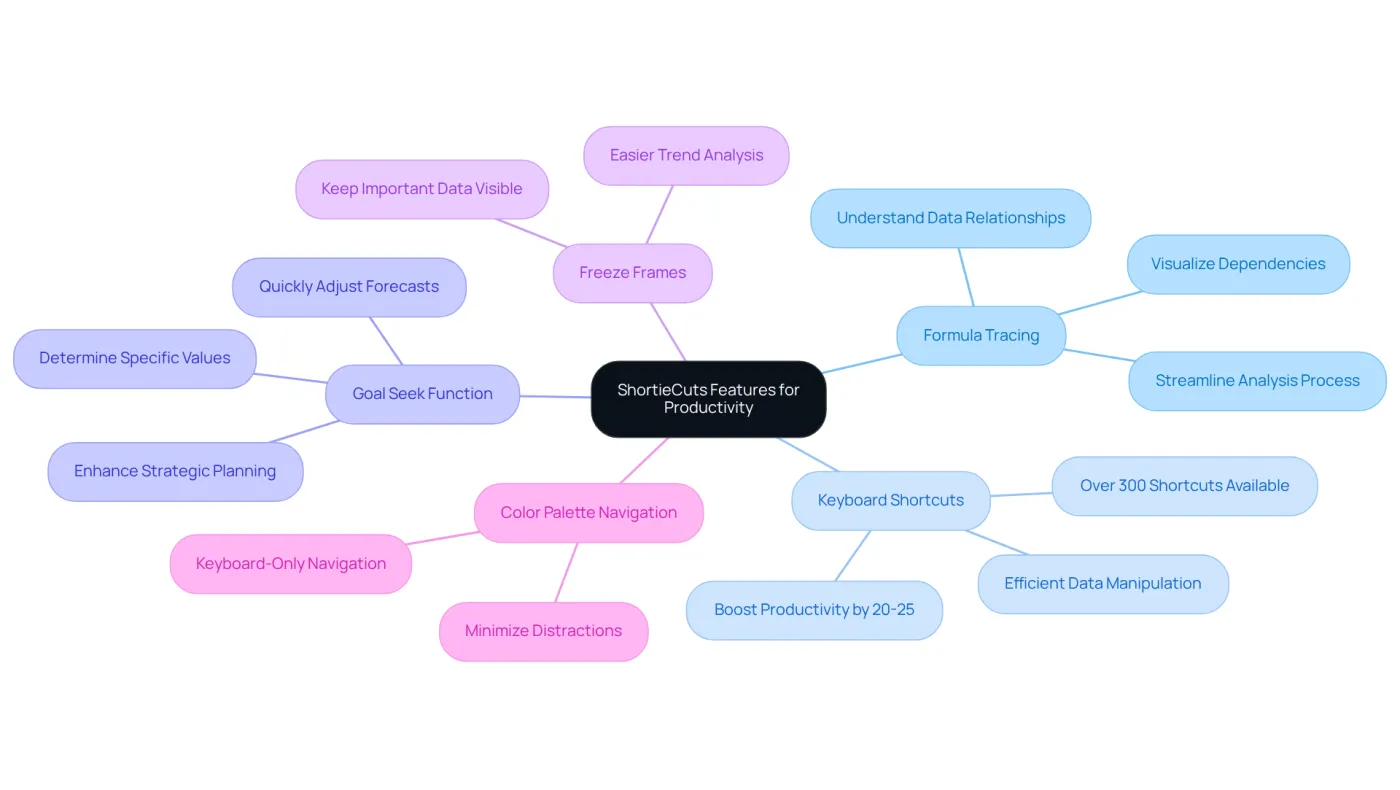
Formula Tracing: Visualize dependencies in your spreadsheets with the formula tracing capability. Click on a cell containing a formula and use the shortcut (typically Alt + T) to trace both dependents and precedents. This feature enhances your understanding of data relationships, allowing you to see how changes in one cell impact others. Streamline your analysis process and make informed decisions.
-
Keyboard Shortcuts: Familiarize yourself with the extensive library of 233 Excel-style shortcuts available in the application. For instance, quickly insert rows or columns using Ctrl + Shift + '+'. This allows for efficient data manipulation without disrupting your workflow. Studies show that optimizing email and collaboration can boost productivity by 20-25%, underscoring the importance of mastering these shortcuts.
-
Goal Seek Function: To utilize the Goal Seek option, navigate to the cell where you want to determine a specific value. Access the Goal Seek function via the menu or use the shortcut (Alt + G). Input your desired outcome, and let ShortieCuts calculate the necessary input. This streamlines your decision-making process. Finance professionals can quickly adjust forecasts based on varying assumptions, enhancing strategic planning.
-
Freeze Frames: For improved navigation, select the row or column you wish to freeze and use the shortcut (typically Alt + F). This keeps important data visible while scrolling through large datasets, making it easier to analyze trends and patterns.
-
Color Palette Navigation: Take advantage of the enhanced color palette designed for keyboard-only navigation. This functionality allows you to choose options without relying on a mouse, greatly enhancing your workflow and minimizing distractions. As Stephen R. Covey wisely stated, "The key is in not spending time, but in investing it." Using these tools can help you invest your time more effectively.
By effectively utilizing these features, especially if you buy ShortieCuts Chrome extension, you can significantly enhance your productivity in Google Sheets, making your transition from Excel smoother and more efficient. Additionally, incorporating AI tools can lead to potential time savings of up to 5 hours weekly, further emphasizing the efficiency benefits of using this tool.
Troubleshoot Common Issues with ShortieCuts
Troubleshooting ShortieCuts: Maintain Your Productivity
Encountering issues while using ShortieCuts? Don’t worry; you’re not alone. Here’s how to tackle common problems effectively:
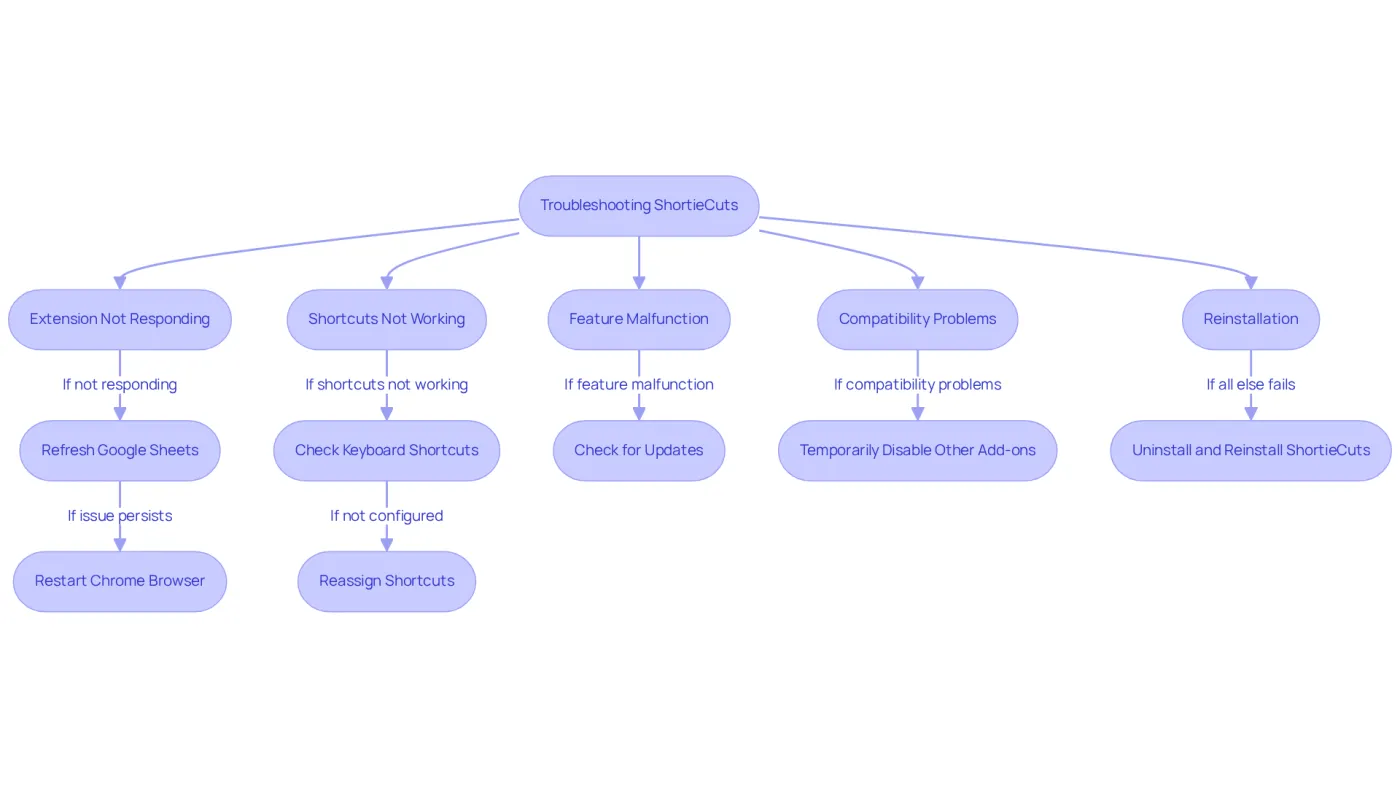
- Extension Not Responding: If ShortieCuts isn’t responding, refresh your Google Sheets page. Should the issue persist, restart your Chrome browser to restore functionality.
- Shortcuts Not Working: Verify that your keyboard shortcuts are correctly configured. Navigate to
chrome://extensions/shortcutsto check if the shortcuts for ShortieCuts are assigned properly. If they aren’t, reassign them. Be mindful that conflicts with other add-ons can lead to shortcut resets, so keep an eye on any additional tools you’ve installed. - Feature Malfunction: If a specific feature, like Goal Seek, isn’t functioning, ensure you have the latest version of the add-on. Check for updates in the Chrome Web Store. Regular updates are crucial, as outdated components can pose security risks and affect performance.
- Compatibility Problems: Facing compatibility issues with other add-ons? Temporarily disable them to pinpoint the conflict. Many users have reported that conflicting add-ons can significantly hinder functionality.
- Reinstallation: If all else fails, consider uninstalling and reinstalling ShortieCuts. This method has proven successful for many users, resolving underlying issues and restoring functionality.
By following these troubleshooting steps, you can swiftly address common issues and maintain a productive workflow, especially if you buy ShortieCuts Chrome extension. Remember, when you buy ShortieCuts Chrome extension, encountering challenges is common among the over 206,000 extensions available in the Chrome Web Store. Being proactive will empower you to navigate these hurdles effectively.
Conclusion
Boosting productivity in Google Sheets has never been easier, thanks to the ShortieCuts Chrome extension. This powerful tool streamlines the purchasing and installation process, equipping users with a suite of features designed to enhance efficiency. By following the outlined steps, you can seamlessly integrate ShortieCuts into your workflow and harness its full potential.
The article highlights the straightforward steps necessary to purchase and install the ShortieCuts extension. Key features include:
- Formula tracing
- An extensive library of keyboard shortcuts
- Effective troubleshooting methods
Each of these elements contributes to a smoother, more productive experience in Google Sheets, making it easier for you to manage tasks and streamline processes.
Investing in the ShortieCuts Chrome extension is a strategic move for anyone aiming to elevate productivity levels. By leveraging its features and adhering to the best practices outlined, you can save valuable time and effort in your daily tasks. Don’t hesitate - take the leap today and discover the significant impact that ShortieCuts can have on your Google Sheets experience.
Frequently Asked Questions
How do I purchase the ShortieCuts Chrome extension?
To purchase the ShortieCuts Chrome extension, open your Chrome browser, navigate to the Chrome Web Store, search for 'ShortieCuts', verify the add-on, access its details page, click 'Add to Chrome', confirm the installation, and follow any prompts to complete your purchase.
What should I do after adding ShortieCuts to Chrome?
After adding ShortieCuts to Chrome, you may need to purchase a subscription or activate options based on the pricing structure displayed on the add-on page.
What payment method do I need to finalize my purchase?
Ensure you have a valid payment method ready to complete your purchase of the ShortieCuts Chrome extension.
What features does the ShortieCuts extension offer?
The ShortieCuts extension offers a full suite of features designed to enhance your productivity in Google Sheets.
How much does the ShortieCuts Chrome extension typically cost?
As of 2026, the average cost for browser add-ons, including ShortieCuts, typically ranges from $5 to $50.
Why should I consider purchasing ShortieCuts?
Purchasing ShortieCuts can significantly enhance your productivity in Google Sheets by streamlining your workflow and simplifying tasks.